Manual.ly Logo

Turtle Beach Stealth 600 Gen 3 Toriatsukai-Setsumeisho

0.0 · 0 評価

PDFマニュアル · 1 ページ

日本語

M: QW-35-FL
ページ

/ 1

Loading...
f5b932a4c668d4e16d179327a38e8fa438a4 page 1
Regulatory Compliance Statements for the STEALTH 600 GEN 3
(Wireless Gaming Headset – Headset Model: HWAA0001 & Dongle Model: HWAA0010)
Federal Communications Commission (FCC) Compliance Notices
Class B Interference Statement
This equipment has been tested and found to comply with the limits for a Class B digital device, pursuant to Part 15, Subpart B of the FCC Rules.
These limits are designed to provide reasonable protection against harmful interference in a residential installation. This equipment generates, uses,
and can radiate radio frequency energy and, if not installed and used in accordance with the instructions,
may cause harmful interference to radio
communications. However, there is no guarantee that interference will not occur in a particular
installation. If this equipment does cause harmful
interference to radio or television reception, which can be determined by turning the equipment o and on, the user is encouraged to try to correct
the interference by one or more of the following measures:
• Reorient or relocate the receiving antenna.
• Increase the separation between the equipment and receiver.
• Connect the equipment into an outlet on a circuit dierent from that to which the receiver is connected.
• Consult the dealer or an experienced radio/TV technician for help.
FCC Caution:
This device complies with Part 15 of the FCC Rules. Operation is subject to the following two conditions: (1) This device may not
cause harmful
interference, and (2) this device must accept any interference received, including interference that may cause undesired
operation. This product is
compliant with the Consumer Product Safety Improvement Act of 2008, Public Law 110314 (CPSIA)
CANADA-statement
This device complies with Innovation, Science and Economic Development Canada’s licence-exempt RSS(s).
Operation is subject to the following two conditions :
(1) This device may not cause interference; and
(2) This device must accept any interference, including interference that may cause undesired operation of the device.
Le présent appareil est conforme aux CNR d’Innovation, Sciences et Développement économique Canada exempt(s)
de licence(s) applicables aux appareils radio exempts de licence. L’exploitation est autorisée aux deux conditions suivantes :
(1) l’appareil ne doit pas produire de brouillage ;
(2) l’utilisateur de l’appareil doit accepter tout brouillage radioélectrique subi, même si le brouillage est susceptible
d’en compromettre le fonctionnement.
Radiation Exposure Statement:
The product complies with Canada portable RF exposure limits set forth for an uncontrolled environment and are safe for intended operation
as described in this manual. The further RF exposure reduction can be achieved if the product can be kept as far as possible from the user body
or set the device to lower output power if such function is available.
Le produit est conforme aux limites d‘exposition pour les appareils portables RF pour les Etats-Unis et le Canada établies pour un environnement
non contrôlé Le produit est sûr pour un fonctionnement tel que décrit dans ce manuel. La réduction aux exposition RF peut être augmentée si
l’appareil peut être conservé aussi loin que possible du corps de l‘utilisateur ou que le dispositif est réglé sur la puissance de sortie la plus faible si
une telle fonction est disponible.
For warranty information and service, please visit www.turtlebeach.com/warranty
WARRANTY SERVICE FOR PURCHASES IN AUSTRALIA
Our goods come with guarantees that cannot be excluded under the Australian Consumer Law. For complete details please visit
www.turtlebeach.com/warranty.
To make a warranty claim in Australia during the Warranty Period, Purchaser should contact the VTB repair centre:
Tecworks International Pty Ltd, 13 Distribution Place, Seven Hills NSW 2147, Tel: 1300 074 512
Turtle Beach Europe Ltd is obligated as a producer with a main activity of selling under The Producer Responsibility Obligations
(Packaging Waste) Regulations 2007. To fulfill our obligation we are registered with Comply Direct and their Recycling Room.
Here you will find advice and information on packaging waste management, recycling symbols and the waste hierarchy principles
of reduce, reuse and recycle. https://www.complydirect.com/the-recycling-room/ For instructions in other languages, please visit
http://www.turtlebeach.com/homologation
Copyright © 2024, Voyetra Turtle Beach, Inc. All rights reserved. No part of this document may be reproduced without permission.
Any product names mentioned in this guide may be trademarks or registered trademarks and are the property of their respective owners.
P/N: 426-249-005-500 RC
This symbol on the product or its packaging indicates that this product must not be disposed of with your other
household waste. Instead, it is your responsibility to dispose of your waste equipment by handing it over to a designated
collection point for the recycling of waste electrical and electronic equipment. The separate collection and recycling
of your waste equipment at the time of disposal will help conserve natural resources and ensure that it is recycled in
a manner that protects human health and the environment. For more information about where you can drop o your
waste for recycling, please contact your local authority, or where you purchased your product.
European Union and European Fair Trade Association (EFTA) Regulatory Compliance
Declaration of Conformity
Marking by this symbol:
Hereby, Voyetra Turtle Beach Inc. declares that Stealth 600 Gen 3 Headset Model: HWBB0001 & Dongle Model: HWAA0001
& HWAA0010 is in compliance with Directive 2014/30/EU(EMC), 2014/53/EU(RED), 2014/35/EU(Safety), 2015/863
amending Annex II to 2011/65/EC(RoHS), 2012/19/EU (WEEE), 2006/1907/EU (REACH), 94/92/EU (PACKAGING), 2006/66/
EU (Battery), Electromagnetic Compatibility Regulations 2016(EMC), Radio Equipment Regulations 2017(Radio), Electrical
Equipment Regulations 2016(Safety), The Restriction of the Use of Certain Hazardous Substances in Electrical and Electronic
Equipment Regulations 2012.
The full text of the EU/UK declaration of conformity is available at the following internet address:
http://www.turtlebeach.com/homologation
Radio frequency: 2400MHz 
Operating frequency: 2400~2483.5MHz 
Max. Output power: 4 dBm
Warning:
To prevent possible hearing damage, do not
listen at high volume levels for long periods.
QUICK START GUIDE
GUIDE DE DÉMARRAGE RAPIDE
IMPORTANT
READ BEFORE USING
IMPORTANT
LIRE AVANT UTILISATION
STEALTH 600 GEN 3
CERTIFICATION MODEL:
HEADSET: HWAA0001
DONGLE: HWAA0010
SETUP FOR XBOX® | CONFIGURATION POUR XBOX®
FR
1. Mettez l‘émetteur sans-fil en mode «Xbox»
2. Connectez l‘émetteur sans-fil au port USB-A de la Xbox
®
3. Allumez le casque
4. Attendez que le casque et l‘émetteur USB soient appairés
DE
1. Stelle den Funksender auf den Modus „Xbox“ ein
2. Verbinde den kabellosen Sender mit dem USB-A
Anschluss der Xbox
®
3. Schalte das Headset ein
4. Warte, bis Headset und USB Sender gekoppelt sind
KO
1. „Xbox“󻡄󻉸󼍬󾘥󻣐󻺼󾘥󽁔󻔸󼁀󻦔󼻌󾘥󻻀󼖱
2. Xbox
®
󼓴USB-A 󽆈󽁔󼍬󾘥󻣐󻺼󾘥󽁔󻔸󼁀󻦔󼻌󾘥󼎌󺩌
3. 󽎀󻉸󻻧󾘥󼖠󼑬󾘥󼲸󺯌
4. 󽎀󻉸󻻧󺪘USB󽁔󻔸󼁀󻦔󼻌󺦜󾘥󽄴󼍐󻝝󻆼󾘥󻋨󺯨󼝜󾘥󻂜󺯌
EN
1. Set the USB wireless transmitter to “Xbox” mode
2. Connect the USB wireless transmitter to the
USB-A port on Xbox
®
3. Power on headset
4. Wait for headset and USB wireless transmitter to pair
ES
1. Configura el transmisor inalámbrico en el modo „Xbox“.
2. Conecta el transmisor inalámbrico al puerto USB-A
de la Xbox
®
.
3. Enciende los auriculares
4. Espera a que se emparejen los auriculares y el transmisor USB
JP
1. ワ イ ヤ レ ス ト ラ ン ス ミ ッ タ ー を「 Xbox」モ ー ド に 設 定 し ま す 。
2. ワイヤレストランス ミッタ ー を Xbox
®
の USB-A
端子に接続します。
3. ヘ ッド セ ット の 電 源 を 入 れ ま す 。
4. ヘ ッド セット と USB トランス ミッタ ー が ペ アリン グ さ れ る の を
待ちます。
1
3
2
4
Xbox Version only
SETUP FOR PLAYSTATION, PC AND NINTENDO SWITCH™
CONFIGURATION POUR PLAYSTATION®, PC ET NINTENDO SWITCH™
FR
1.
M
ettez l‘émetteur sans-fil en mode «USB» (concerne la version
Xbox uniquement; pour toutes les autres versions, passez à l‘étape2)
2. Connectez l‘émetteur sans-fil au port USB-A de la PlayStation
®
,
PC ou Nintendo Switch
™
3. Allumez le casque
4. Attendez que le casque et l‘émetteur USB soient appairés
DE
1. Stelle den Funksender auf den Modus „USB“ ein (nur Xbox-
Version – alle anderen Versionen, fahre mit Schritt 2 fort)
2. Verbinde den kabellosen Sender mit dem USB-A
Anschluss von PlayStation
®
, PC oder Nintendo Switch
™
3. Schalte das Headset ein
4. Warte, bis Headset und USB Sender gekoppelt sind
KO
1. “USB“󻡄󻉸󼍬󾘥󻣐󻺼󾘥󽁔󻔸󼁀󻦔󼻌󾘥󻻀󼖱Xbox󻨠󼖠󻝨󾘥󽌐󻂕󺯌󼹜󾘥󻡄󻉼󾘥󻨠
󼖠󼓜 2󻂄󺩠󻗸󾘥󼝠󽌥
2. USB-A 󽆈󽁔󼍬󾘥󻣐󻺼󾘥󽁔󻔸󼁀󻦔󼻌󾘥󼎌󺩌
(PlayStation
®
, PC󻎬󻀰Nintendo Switch
™
)
3. 󽎀󻉸󻻧󾘥󼖠󼑬󾘥󼲸󺯌
4. 󽎀󻉸󻻧󺪘USB󽁔󻔸󼁀󻦔󼻌󺦜󾘥󽄴󼍐󻝝󻆼󾘥󻋨󺯨󼝜󾘥󻂜󺯌
(Xbox version)
(PS/PC version)
EN
1. Set the USB wireless transmitter to “USB“ mode
(Xbox version only – all other versions, proceed to step 2)
2. Connect the USB wireless transmitter to the USB-A
port on PlayStation
®
, PC or Nintendo Switch
™
3. Power on headset
4. Wait for headset and USB wireless transmitter to pair
ES
1. Configura el transmisor inalámbrico en el modo „USB“
(solo en la versión para Xbox; en todas las demás
versiones, ve al paso 2).
2. Conecta el transmisor inalámbrico al puerto USB-A
en PlayStation
®
, PC o Nintendo Switch
™
3. Enciende los auriculares
4. Espera a que se emparejen los auriculares y el transmisor USB
JP
1. ワ イ ヤ レ ス ト ラ ン ス ミ ッ タ ー を「 USB」モ ー ド に 設 定 し ま す( Xbox
バ ー ジョンの み 。他 の バ ー ジョン の 場 合 はステップ 2 に 進 む 。)
2. ワ イ ヤ レ ストラ ン スミッタ ー を PlayStation
®
、PC、Nintendo
Switch
™
の USB-A端子に接続します。
3. ヘ ッド セ ット の 電 源 を 入 れ ま す 。
4. ヘ ッド セット と USB トラン スミッタ ー が ペ アリン グさ れ る の を 待 ちま す。
1
3
2
4
HEADSET CONTROLS | COMMANDES DU CASQUE
Bouton QuickSwitch
Appuyer (1s) = Basculer
entre les modes RF 2,4 GHz
et Bluetooth
LED Status Indication
Indication de statut LED
EQ Mode Button
Bouton de mode égaliseur
Power Button, Superhuman Hearing
Press (2s) = Power on/o
Press (1s) = Superhuman Hearing on/o
Bouton d‘alimentation
Appuyer (2s) = Allumer
USB Charge & Update Port
Port de mise à jour
et charge USB
Mute | Désactivation du microUnmute | Activation du micro
Bluetooth Multi-Function
Button (MFB)
See Bluetooth Pairing setup
Bouton multifonction
Bluetooth (MFB)
Voir la configuration de
l‘appairage Bluetooth
Master Volume
Volume principal
Game / Chat Mix ,
Variable Mic-Monitoring
Game / Chat Mix on Xbox version only
Variable Mic-Monitoring on PlayStation
and PC versions
Volume de réglage du chat/micro
Volume du chat sur la version Xbox
uniquement. Volume de réglage du retour
micro sur les versions PC et PlayStation
Any questions? Des questions?
www.turtlebeach.com/support
Please register your product to receive important updates.
Enregistrez votre produit pour recevoir les mises à jour importantes.
www.turtlebeach.com/productregistration
For warranty, visit:
Concernant la garantie, visitez :
www.turtlebeach.com/warranty
The Stealth 600 will enter Bluetooth pairing mode when
powered on. If no Bluetooth connection is made within
two minutes, pairing mode will stop. To pair new devices,
follow the Bluetooth pairing steps on this page.
Le Stealth 600 entrera en mode d‘appairage Bluetooth
lorsqu‘il sera allumé. Si aucune connexion Bluetooth
n‘est eectuée dans les deux minutes, le mode appai-
rage se désactive. Pour appairer de nouveaux appareils,
suivez les étapes Bluetooth sur cette page.
BLUETOOTH SETUP | CONFIGURATION BLUETOOTH
The QuickSwitch button allows you to quickly switch between low-latency 2.4GHz Wireless and
Bluetooth modes based on your preference. Use Bluetooth mode to make calls, listen to music or
connect to other compatible Bluetooth devices. We recommend using the 2.4GHz Wireless mode
for best performance when gaming on consoles or PC.
Note:
Select advanced audio features available in 2.4GHz Wireless mode may not be supported
in Bluetooth mode.
Le bouton QuickSwitch vous permet de basculer rapidement entre les modes sans-fil 2,4 GHz à
faible latence et le Bluetooth selon vos préférences. Utilisez le mode Bluetooth pour passer des
appels, écouter de la musique ou vous connecter à d‘autres appareils Bluetooth compatibles.
Nous recommandons d‘utiliser le mode sans-fil 2,4 GHz pour obtenir les meilleures performances
en jeux sur consoles ou PC.
Remarque : Certaines fonctions audio avancées disponibles en mode sans-fil 2,4 GHz peuvent ne
pas être prises en charge en mode Bluetooth.
To enable Bluetooth pairing mode:
1. Press and hold the Bluetooth multi-function button (MFB)
until the “Pairing Bluetooth” voice prompt plays.
2. After placing your headset in pairing mode, select the
headset from within your device’s Bluetooth settings
menu to connect.
3. The Bluetooth MFB is used to answer and end calls as well
as media playback control when connected to a compatible
mobile phone.
QUICKSWITCH BUTTON | BOUTON QUICKSWITCH
When the headset is connected using the USB wireless trans-
mitter in the default 2.4GHz Wireless mode, incoming calls can
be answered by single pressing the Bluetooth MFB. The headset
will automatically switch back to 2.4GHz Wireless mode when
the call is ended by single pressing the Bluetooth MFB again.
Activation du mode d’appairage Bluetooth :
1. Appuyez sur le bouton multifonction Bluetooth (MFB) et
maintenez-le enfoncé jusqu‘à ce que vous entendiez le
message vocal „Pairing Bluetooth“.
2. Après avoir placé votre casque en mode d‘appairage, sélec-
tionnez-le dans le menu des paramètres Bluetooth de votre
appareil pour vous connecter.
3. Le bouton MFB Bluetooth est utilisé pour répondre et mettre
fin aux appels ainsi que pour contrôler la lecture des médias
lorsqu‘il est connecté à un téléphone portable compatible.
Lorsque le casque est connecté à l‘aide de l‘émetteur sans-fil USB
en mode sans fil 2,4 GHz par défaut, il est possible de répondre aux
appels entrants en appuyant simplement sur le bouton MFB Blue-
tooth. Le casque repasse automatiquement en mode sans-fil 2,4 GHz
lorsque l‘appel est terminé en appuyant à nouveau sur le bouton MFB.
IMPORTANT | IMPORTANT
PLEASE MAKE SURE YOUR HEADSET IS UPDATED WITH THE LATEST FIRMWARE.
VEUILLEZ VOUS ASSURER QUE VOTRE CASQUE DISPOSE DE LA DERNIÈRE
VERSION DU MICROLOGICIEL.
Android iOS
Download the Swarm
™
II mobile app for Android or iOS to update your headset
to the latest firmware and customize settings.
Alternatively, you can use the Swarm
™
II desktop software for Windows
available at turtlebeach.com/swarm2
Téléchargez l‘application mobile Swarm
™
II pour Android ou iOS afin de mettre votre
casque à jour avec la dernière version du micrologiciel et de personnaliser les paramètres.
Vous pouvez également utiliser le logiciel Swarm
™
II pour Windows,
disponible sur turtlebeach.com/swarm2
Stealth™ 600 Gaming Headset
Casque de jeu Stealth™ 600
USB Wireless Transmitter
OR
Xbox
version
PS/PC
version
Récepteur USB sans-fil
Charging Cable (USB-A to USB-C)
Câble de chargement (USB-A vers USB-C)
PACKAGE CONTENTS | CONTENU
QuickSwitch Button
Press (1s) = Switch between
2.4GHz Wireless and
Bluetooth modes
Bouton d‘alimentation, Superhuman Hearing
Appuyez (2s) = Allumer/éteindre
Appuyez (1s) = Superhuman Hearing on/o

AIを使用して Turtle Beach Stealth 600 Gen 3 のマニュアルとチャットする

Turtle Beach Stealth 600 Gen 3 のマニュアルからAIによる即時回答を取得

Turtle Beach Stealth 600 Gen 3に関する質問なら何でもどうぞ。回答はこのマニュアルから提供され、根拠となるページも表示されます。

質問を<\/span>する<\/span><\/span>

0/1000

Stealth 600 Gen 3 をおすすめしますか?

はい いいえ

よくある 質問

A

現在の好みに応じて 2.4GHz ワイヤレスと Bluetooth モードの間に切り替えるために、QuickSwitch ボタンを一度押します。

この回答は役に立ちましたか?

A

はい、ヘッドセットは included USB ワイヤレストランスミッターを使用して Xbox で動作します。これは USB-A ポート経由で Xbox モードに設定されます。

この回答は役に立ちましたか?

A

最新の機能パフォーマンスが正しく動作するように、Swarm モバイルアプリまたはデスクトップソフトウェアを使用してファームウェアの更新が推奨されます。

この回答は役に立ちましたか?

A

はい、Xbox バージョンでは可変マイクモニタリングが利用可能です。一方、PC および PlayStation バージョンは調整可能なマイクモニターボリュームを提供します。

この回答は役に立ちましたか?

A

起動後 2 分以内に接続が行われない場合、ペアリングモードは停止し、再度ペアリングするには再アクティブ化する必要があります。

この回答は役に立ちましたか?

A

デバイスの側面にある USB チャージおよびアップデートポートに挿入された提供された USB ケーブルを使用してヘッドセットを充電します。

この回答は役に立ちましたか?

A

警告は、ゲーミング中に可能的な聴力損傷を防ぐために長時間高音量レベルで聴くことを避けるようアドバイスしています。

この回答は役に立ちましたか?

M: QW-35-FL

利点 および 欠点

利点

  • QuickSwitch ボタンは、Versatile なデバイス使用のために 2.4GHz と Bluetooth モード間のスムーズな移行を可能にします。
  • 広範な互換性のために Xbox、PlayStation、PC、および Nintendo Switch を含む複数のプラットフォームをサポートします。
  • 競争ゲーム状況において重要となる強化されたオーディオキューを提供する Superhuman Hearing 機能が含まれています。
  • 可変マイクモニタリングはプレイヤーが自分の声を明確に聞くことを許可し、より良いチームコミュニケーションをもたらします。
  • Swarm アプリを通じたファームウェア更新は、時間の経過とともに耐用年数とパフォーマンスの向上を保証します。
VS

短所

  • ワイヤレスモードで利用可能な高度なオーディオ機能は、Bluetooth プロトコル経由で接続されている場合はサポートされない場合があります。
  • 最適な機能性ステータスを維持するためには、外部ソフトウェアまたはアプリを介した特定のファームウェア更新が必要です。
  • USB ワイヤレストランスミッターの設定は、Xbox と他のプラットフォーム構成間で異なり、モード変更を必要とします。
  • 基本的なテキストには明記されたバッテリー寿命の指定が提供されていないため、連続プレイ時間の期待値が制限されます。
  • Bluetooth のペアリングモードは 2 分の非活動後に停止し、新しいデバイス接続のために再アクティブ化が必要です。
M: QW-35-FL

製品 仕様

タイプ

ヘッドホン (オーバーイヤー)

デザイン

ヘッドバンド

方式

密閉型

マイク

ブームマイク

無線

Bluetooth 5.2, デジタルワイヤレス

操作

音量調節, ミュートボタン (マイクフリップ)

バッテリー持続時間

80 時間

充電ポート

USB-C 充電ポート

再生周波数

20Hz-20kHz

ドライバー

5.00 cm

ソフトウェア機能

イコライザープリセット, カスタムイコライザー, アプリコントロール

特別仕様

USB ワイヤレスアダプター同梱

M: QW-35-FL

製品 説明

すべての現代ゲーマーのための没入型オーディオ

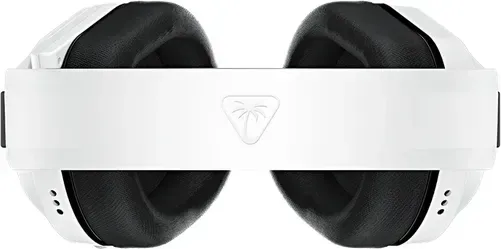
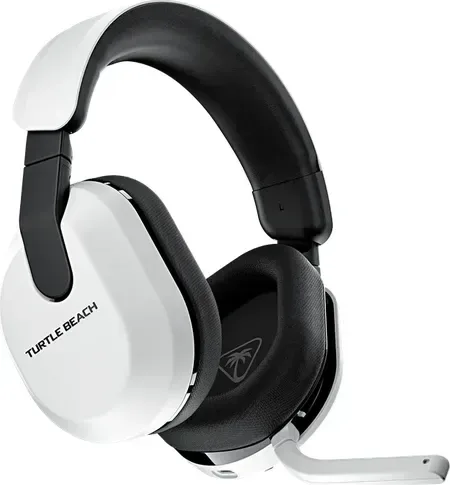
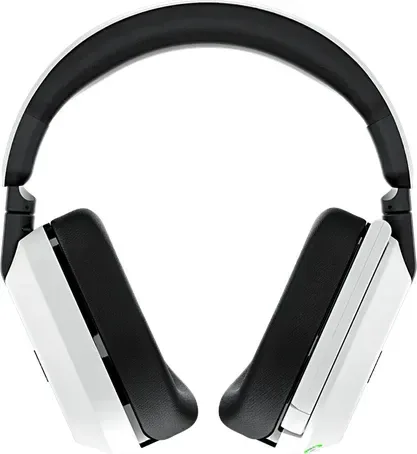
Turtle Beach ステルス 600 Gen 3 は、複数のプラットフォームを同時に操作したいゲーマーにとっての優れた選択肢として際立っています。Xbox、PlayStation、PC、または Nintendo Switch であれば、このヘッドセットは激しい競技に適した_exceptional_なオーディオ性能を提供します。その顕著な特徴の一つは、デバイス間で接続を容易に管理できる能力です。ユーザーは、ハードウェア構成の詳細な機能を理解するために、Turtle Beach ステルス 600 Gen 3 マニュアルのようなドキュメントを参照することがよくあります。

シームレスな接続と設定手順

ヘッドセットのセットアップはメーカーから提供される明確な手順により簡単です。地域固有モデルについて説明されています。Xbox ユーザーの場合、送信機を Xbox モードに設定し、コンソールの USB ポートにプラグインしてください。電源を入れてすぐにペイアリングプロセスが発生し、すぐに安定したワイヤレスリンクを確立します。PlayStation、PC、および Switch ユーザーは、送信機を USB-A ポートに直接接続します。Xbox ドングルを使用している場合を除き、最初にモードを切り替える必要はありません。QuickSwitch ボタンを使用すると、低遅延 2.4GHz ワイヤレスと Bluetooth モードの間を迅速にかつシームレスに切り替えることができます。この柔軟性により、コンソールのゲームセッション全体を切断せずに、電話で通話に応答したり音楽を聴いたりすることができます。

高度なオーディオ機能と制御インターフェース

オーディオのカスタマイズは、左側のイヤーカップシェルに直接ある直感的なオンボードコントロールによって処理されます。ボリュームホイールはすべてのオーディオタイプに対して即座にマスターレベルを調整し、分離したミックスノブは正確にゲームとチャットのオーディオをバランスさせます。Xbox バージョンでは、変数マイクモニタリングへのアクセスがあり、不自然な歪みなしに自分の声を明確に聞くことができます。Superhuman Hearing 設定は、競争相手プレイ中に敵を発見するために不可欠な強化されたオーディオキューを提供します。デバイスのパフォーマンスを長期間最適に保つためには、日々の使用を開始する前に Swarm モバイルアプリまたはデスクトップソフトウェアを通じてファームウェアを更新することが強く推奨されます。

長時間セッションのための快適性とデザイン

拡張されたゲームセッション用に設計されており、ふわふわしたメモリーフォームのイヤーパッドは、マラソンマッチ中に身体的疲労を減らすためにソフトなサポートを提供します。調節可能なヘッドバンドは、重さを頭の上部に均等に分配し、予想外に外れずにゲームプレイ全体にわたって安定性を確保します。充電は、右側のパネルにある専用の USB-C ポートを介して便利に行えます。この電源管理システムにより、壁コンセントに縛られて過ごす時間が短くなり、屋内で安全にバーチャルワールド環境に没頭する時間が増えます。規制の遵守は、通常動作中の人体近くでの放射線被ばく限度を満たすことを保証します。警告ラベルは、使用中の聴力障害を防ぐために長時間の高音量レベルを避けることを提案しています。

今日の全体的な体験を最大化する

セットアップ手順を理解し、QuickSwitch を効果的に使用することにより、プレイヤーは真に没入度を最大化します。クリスタルクリアな通信または没入型のサウンドスケープを優先するかかわらず、このヘッドセットは現在入手可能な様々なゲームエコシステム全体であなたの多様なニーズに効果的に適応します。公的仕様で定期的に説明されている潜在的な干渉問題を防ぐために、ユニットが常に最新であることを確認してください。製品を登録することは、継続的な信頼性のためのファームウェアパッチに関する重要な更新を受け取るのに役立ちます。

M: QW-35-FL

© Copyright 2026 Manual.ly