Manual.ly Logo

Midas M32R Toriatsukai-Setsumeisho

0.0 · 0 評価

PDFマニュアル · 67 ページ

日本語

M: claude-opus-5-5
ページ

/ 67

Loading...
midas-m32r-digital-console-user-manual-35080df3-a5bc-49cc-88ca-5bc200d96529 page 3b
59 DIGITAL RACK MIXER M32R User Manual
4.5 Appendix E: Service Information
This appendix contains routine service information for the M32R Digital Console.
Routine Maintenance
To help keep your M32R Digital Console unit in good working order and to make
sure it gives you optimum performance, we recommend that you carry out the
following about once every month.
• Clean the control centre, as detailed in ‘Cleaning the control centre’
(below)
• Check controls for freedom of operation. As the controls are
‘self-cleaning’, this operation will help to prevent them from sticking
• Check the functionality of all controls, that is, control knobs, faders,
pushbuttons, LEDs, etc.
• Check the functionality of equipment.
Cleaning The Control Centre
Switch o the control centre and electrically isolate it from the mains
before cleaning.
Clean the control centre using a dry, lint-free cloth. Do not use harsh abrasives or
solvents. When cleaning the equipment, take great care not to damage faders,
pushbuttons etc.
Cleaning a GUI Screen
Switch o the control centre and electrically isolate it from the mains
before cleaning.
Carefully wipe the surface of the GUI screen with a soft, lint-free cloth or screen
wipe specially designed for the purpose. When cleaning the GUI screen, observe
the following precautions:
• Avoid putting pressure on the screen
• Don’t use harsh abrasives, for example, paper towels
• Don’t apply liquids directly to the screen
• Don’t use ammonia-based cleaners and solvents, such as acetone.
If you are in doubt or have any queries about cleaning the GUI screens,
contact Midas Technical Support.
Equipment Disposal
When this equipment has come to the end of it useful life, its disposal may
come under the DIRECTIVE 2012/19/EU OF THE EUROPEAN PARLIAMENT
AND OF THE COUNCIL of 27 January 2003 on waste electrical and electronic
equipment (WEEE).
Hazardous substances in WEEE contaminate water,
soil and air and ultimately put at risk our environment
and health. The directive aims to minimize the impacts
of WEEE on the environment during their lifetimes and
when they become waste.
The WEEE directive addresses the disposal of products
when they have reached the end of their life and
contributes to the reduction of wasteful consumption
of natural resources. This will help to reduce pollution,
and protect the environment and ourselves.
If this equipment carries a ‘crossed-out wheelie bin’ (shown left), please do
not dispose of WEEE as unsorted municipal waste but collect and dispose of in
accordance with local WEEE legislation. The horizontal bar underneath indicates
that the product was placed on the EU market after 13th August 2005.
For WEEE disposal see our website at midasconsoles.com for information.
4.6 Appendix F: Glossary
This glossary provides an explanation of the symbols, terms and abbreviations
used in this manual.
5.1 surround: A surround sound system created from six channels that form
a discrete signal, which is played back over a speaker system comprising
ve speakers (three front and two rear) and a subwoofer (which is the ‘.1’ or
LFE channel). See LFE.
μ: Micro- prex symbol that represents 10
-6
or one millionth.
A
A/D: Abbreviation for ‘analogue to digital’. The conversion of a continuous signal
into a numeric discrete sample sequence.
AC: Abbreviation for ‘alternating current’.
AES/EBU: Abbreviation for ‘Audio Engineering Society/European Broadcasting
Union’. See AES3.
Acoustic feedback: A sound loop existing between an audio input and
audio output that is amplied on each cycle. For example, a mic input signal
is amplied and passed to a loudspeaker. The output from the loudspeaker is
picked up the mic, which amplies it again and passes it back to the loudspeaker,
and so on.
AES3: Also known as ‘AES/EBU’, this is a serial interface for transferring digital
audio between devices.
AES50: AES digital audio engineering standard. AES50 is a high resolution,
multi-channel audio interconnection (HRMAI). Rather than a network, it is a
high-performance, point-to-point audio interconnection, although the auxiliary
data may operate as a true network, independently of the audio. HRMAI provides
a professional multi-channel audio interconnection that uses Cat 5e data cable
and is compatible with Ethernet networks.
AFL: Abbreviation for ‘after fader listen’. A function that allows the signal to be
monitored post-fader, that is, after it has been acted upon by the fader.
Algorithm: In computing, a set of instructions for accomplishing a specic task.
amp (A): Abbreviation for ‘ampere’. A unit of current.
Anti-aliasing: When referring to digital images, a technique that avoids
poor pixelation.
Area A: Primary input control area.
Area B: A secondary input control area.
Assignable controls: User-assignable controls that can be set up to operate
other functions.
Auto safe: Prevents channel from accepting scene recall.
Auto-mute: A function that automatically mutes the channel’s signal under
certain conditions.
Auto-mute group: A function that automatically mutes a number of selected
channels under certain conditions.
Automation: 1. Memorization and playback of changes made to mixer settings.
2. An area on the master bay that controls these.
Aux: Abbreviation for ‘auxiliary send’ or ‘aux send’. A designation for extra
buses, typically used for sending signal to eects, headphone amps and other
destinations. See Bus.
Aux send: See Aux.
B
Balanced audio: A type of audio connection that uses the three leads in a cable,
connector and jack as part of a phase-cancelling arrangement to boost the signal
and reduce noise.
Band: In EQ, a range of frequencies.
Bandwidth: In EQ, the width of a band, that is, the number of frequencies that
will be boosted/cut above and below a centre frequency.

AIを使用して Midas M32R のマニュアルとチャットする

Midas M32R のマニュアルからAIによる即時回答を取得

Midas M32Rに関する質問なら何でもどうぞ。回答はこのマニュアルから提供され、根拠となるページも表示されます。

M32R メンテナンススケジュール

メンテナンス時期を通知する
毎月
コントロールセンターとGUI画面の清掃

電源を切り、主電源から遮断してください。乾いた lint-free (綿ぼこりが出ない) クロスで拭き取ってください。強い研磨剤、溶剤、アンモニア系洗浄剤の使用、または画面への直接の液体噴霧は避けてください。

マニュアルに表示 (59ページ)
毎月
操作部の動作確認

すべてのコントロールノブ、フェーダー、プッシュボタンが自由に動くことを確認し、引っかかりを防いでください。これらの操作部はセルフクリーニング機能があります。

マニュアルに表示 (59ページ)
毎月
すべての操作部および機器の機能確認

すべてのハードウェア操作部(ノブ、フェーダー、ボタン、LED)の動作を点検し、機器全体の機能を確認してください。

マニュアルに表示 (59ページ)

無料メンテナンスリマインダー

購入日に合わせてお知らせします。常に無料で、いつでも配信停止できます。

送信することで、プライバシーポリシーに同意したものとみなされます。メール内のワンクリックでいつでも配信停止できます。
M: qwen/qwen3.8-flash

質問を<\/span>する<\/span><\/span>

0/1000

M32R をおすすめしますか?

はい いいえ

よくある 質問

A

Midas M32R は、16個の Midas PRO シリーズ デジタル制御可能マイクロホンプリアンプを備えています。各入力はバランスまたはアンバランスのマイクレベルまたはラインレベル信号を受け付けることができ、スイッチ可能なファンタム電源、72 dB のゲイン範囲、クリップ前の最大レベル +23 dBu が含まれます。

この回答は役に立ちましたか?

A

はい、フロントパネルの USB ポートを使用して、任意のステレオ信号を USB スティックまたは互換性のある USB ハードドライブに直接録音できます。ただし、マルチチャンネル録音は Klark Teknik DN32-USB インターフェースカード経由でのみ利用可能であることに注意してください。

この回答は役に立ちましたか?

A

M32R には、アクセス可能なソースとディスティネーションの合計168 x 168があります。これは、オンボード I/O と、96 x 96 信号を提供するために Klark Teknik SuperMAC 技術を採用しているデュアル AES50 イーサネットジャックによって達成されます。

この回答は役に立ちましたか?

A

はい、M32R は16チャンネルの ULTRANET パーソナルモニタリングをサポートしています。また、Behringer P-16 パーソナルモニタリングシステムとシームレスに統合され、完全なライブ、スタジオ、インストールサウンドソリューションを提供します。

この回答は役に立ちましたか?

A

ファームウェアを更新するには、新しいファイルを FAT フォーマットされた USB フラッシュドライブのルートレベルにダウンロードします。コンソールの電源が入っていない状態で、ドライブをフロントパネルの USB コネクタに接続し、コンソールの電源を入れる際に USB View ボタンを押さえ続けます。更新には通常の起動より2〜3分長くかかります。

この回答は役に立ちましたか?

M: qwen/qwen3.8-flash

利点 および 欠点

利点

  • 受賞歴のある Midas PRO シリーズ デジタル制御可能マイクプリアンプを16個含む
  • 信頼性の高いパフォーマンスのために100万サイクル動作に耐えるよう評価された16個の Midas PRO モーター式フェーダーを備える
  • SuperMAC AES50 を介した96双方向チャンネルによる広範な接続性を提供
  • 他の M32 コンソール、DL16 ステージボックス、P-16 モニタリングシステムとシームレスに統合
VS

短所

  • マルチチャンネル録音は別売りの DN32-USB 拡張カード経由でのみ利用可能
  • 内部にユーザーが整備できる部品なし; 修理は資格のある人員によってのみ行う必要があります
  • USB ソケットはキーボードやマウスなどのメモリ以外のデバイスには適していません
  • 安全ガイドラインに従い、熱帯または中程度の気候で機器を使用する必要があります
M: qwen/qwen3.8-flash

製品 説明

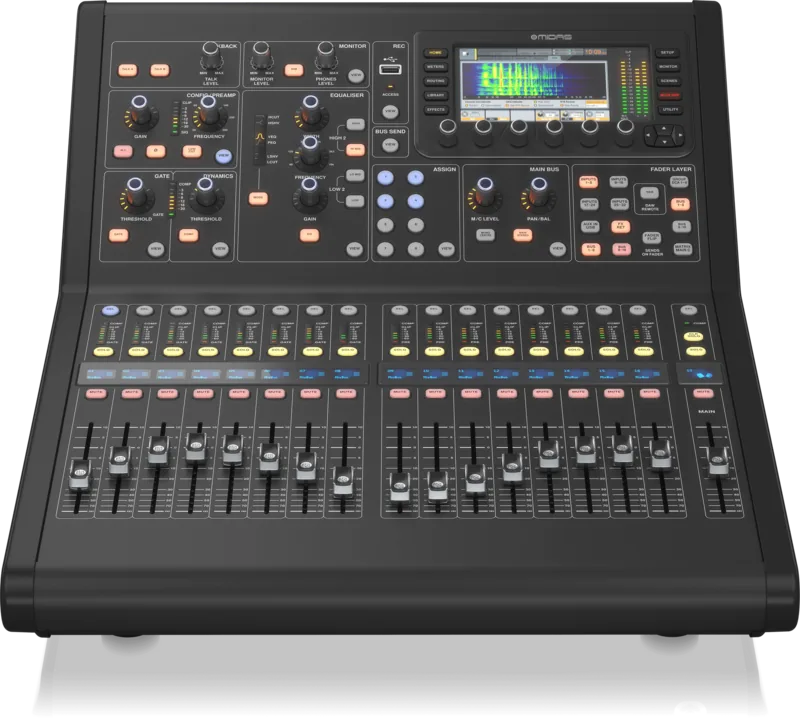
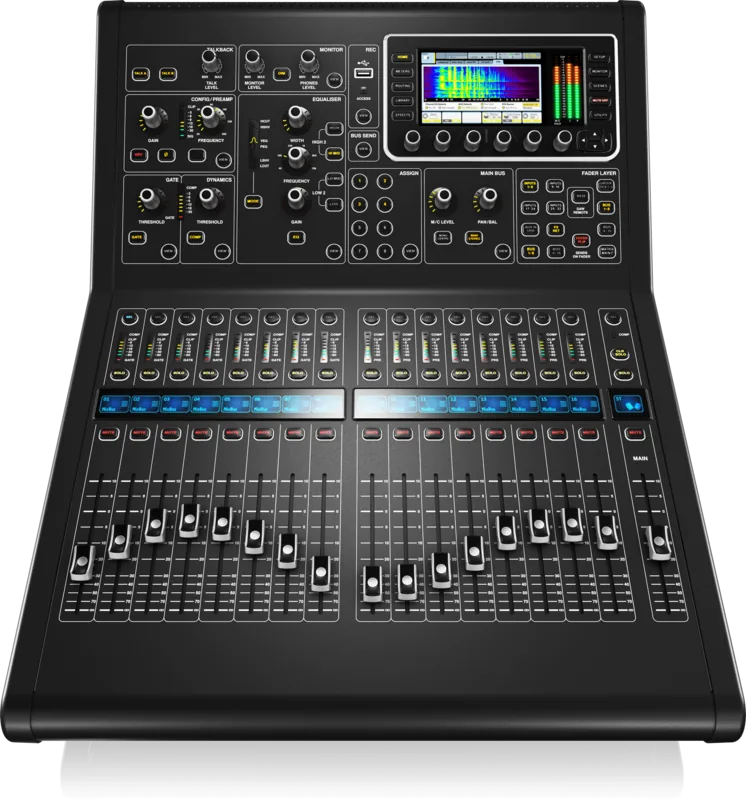
Midas M32R デジタルコンソール概要

Midas M32R は、ライブサウンドとスタジオアプリケーションの両方に適したデジタルラックミキサーです。Midas PRO シリーズの高い評価を得ているオーディオ品質と、コンパクトでデスクトップフレンドリーなフォームファクターを組み合わせています。このコンソールは40入力チャンネルを備え、16個の Midas PRO マイクロホンプリアンプを搭載し、25ミックスバスを装備しています。本機は、拡張された接続性と信号処理機能を簡潔なパッケージで提供するように設計されています。

主要機能と接続性

M32R は、スイッチ可能なファンタム電源、72 dB のゲイン範囲、クリップ前の最大レベル +23 dBu を提供する、受賞歴のある Midas PRO シリーズマイクロホンプリアンプを統合しています。16個のマイク入力のそれぞれは、バランスまたはアンバランスのマイクレベルまたはラインレベル信号を受け付けます。コントロールサーフェスには、入力セクション用の8つの高分解能100 mm モーター式フェーダーと、DCA グループ、バスマスター、マトリクスを制御するための別の8つのフェーダーセットが含まれています。これらのフェーダーは100万サイクル動作に耐えるよう評価されており、頻繁な使用時の耐久性を保証します。

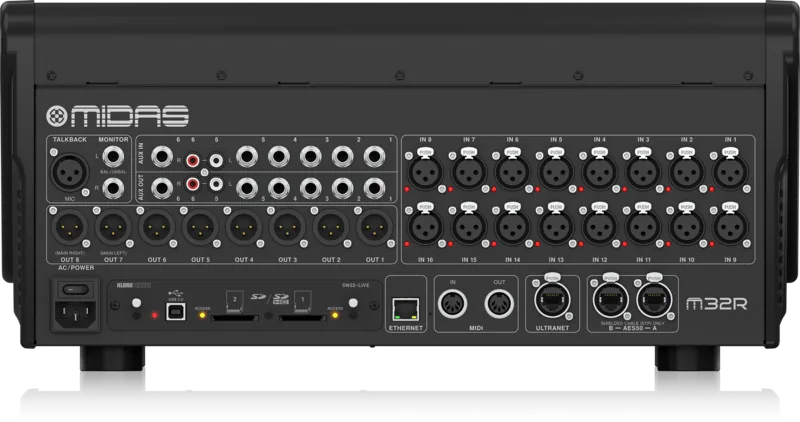
接続オプションは豊富で、Klark Teknik SuperMAC 技術を利用するデュアル AES50 イーサネットジャックを備えています。これにより、AES50 を介して96双方向チャンネルが可能になり、アクセス可能なソースとディスティネーションの合計数が168 x 168 に達します。さらに、リアパネルには6つのラインレベル補助入力と出力、8つの XLR 出力、XLR/TRS 上のステレオモニタリングアウト、デュアルフォン出力が提供されます。パーソナルモニタリングの場合、コンソールは16チャンネルの ULTRANET 出力をサポートします。

レコーディングとエフェクト

M32R には、システムデータストレージまたはボードミックスの外部フラッシュドライブやハードドライブへの直接録音を可能にするトップパネル USB コネクタが含まれています。マルチチャンネル録音には DN32-USB カードが必要ですが、非圧縮ステレオ WAV ファイルは USB を介して直接録音できます。内部エフェクトラックは、60以上のエフェクトモデルを持つ8つの真のステレオプロセッサを提供し、追加のアウトボード機器の必要性を排除します。ユーザーは、ディレイ、コーラス、リバーブなどの高品質なエフェクトを4つ同時に実行でき、さらに31バンドグラフィックイコライゼーションの8チャンネルも利用可能です。

ワークフローと制御

直感的なワークフロー向けに設計されたコンソールは、日光下でも視認可能な TFT スクリーンと、ゲイン、ダイナミクス、EQ、その他の機能への即時アクセスを提供する専用チャンネル編集コントロールを備えています。幅5インチの高コントラストカラーディスプレイは、複雑なパラメータのナビゲーションを支援します。システムは、iPad アプリケーションまたはイーサネット経由で接続された編集ソフトウェアによるリモートコントロールをサポートしています。シーン保存およびリコール機能により、素早いセットアップ変更が可能になり、インストール環境およびプロダクションサウンド環境に最適です。

M: claude-opus-5-5

© Copyright 2026 Manual.ly