
Kensington SD4700P Toriatsukai-Setsumeisho
PDFマニュアル · 10 ページ
日本語



クイックチェック
正解ではありません。もう一度お試しください。
AIを使用して Kensington SD4700P のマニュアルとチャットする
Kensington SD4700P のマニュアルからAIによる即時回答を取得
Kensington SD4700Pに関する質問なら何でもどうぞ。回答はこのマニュアルから提供され、根拠となるページも表示されます。
質問を<\/span>する<\/span><\/span>
SD4700P をおすすめしますか?
はい いいえよくある 質問
このドッキングステーションは DisplayPort と HDMI アウトプットを通じてデュアルモニターセットアップをサポートします 接続されたディスプレイ上での作業タスクおよびマルチメディア消費のために明確なビジュアルを保証する 2160 レベルの解像度を効果的に処理します
この回答は役に立ちましたか?
はい 最大 60 ワットの電力を提供します これは 他のアクセサリーを使用している間にラップトップを充電できるようにし 日常的な使用における別充電器の必要性を排除します
この回答は役に立ちましたか?
Windows 7 および 10 および 10.13 またはそれ以降を実行する Mac オペレーティングシステムで動作します ドライバは 統合のために自動的にまたは Windows Update センターを介してインストールされます
この回答は役に立ちましたか?
はい ビルトインのギガビットイーサネットポートを特徴としています これは ビデオ通話および大規模ファイル転送のための安定したネットワークアクセスを保証し Wi-Fi 接続のみを頼る必要なくします
この回答は役に立ちましたか?
セキュリティロックや特定のケーブルのようないくつかのアクセサリーは別売りされています 設定との互換性を確保するために インストールする前に必ず要件を確認し 追加オプションを購入してください
この回答は役に立ちましたか?
Windows システムには Windows Update を使用するか Mac 更新には公式ソフトウェアサイトを訪れてください 定期的な更新は システムを安全に保ち 時間が経ってもパフォーマンスが最適であることを保証します
この回答は役に立ちましたか?
利点 および 欠点
利点

- DisplayPort および HDMI を介したデュアルディスプレイ出力をサポートし エンハンスされたマルチタスク生産性を提供
- ホストラップトップを直接充電するための最大 60 ワットの電力供給を提供
- Windows および macOS を含む主要なオペレーティングシステムとドライバの摩擦なしに互換性があります
- 重い使用期間中の信頼できるネットワーク接続のためにギガビットイーサネットを具備
- USB 3.1 ポートは 毎秒 5 ギガビットの高速データ転送レートを提供
短所

- ロックのような特定のセキュリティアクセサリーは別売りであり 独立して購入する必要があります
- すべてのホストラップトップの電力要件との互換性を保証するために特定の電力マッチングが必要です
- レガシーアダプターポートが必要であれば いくつかのモニターケーブルは別々に必要になる場合があります
- USB 3.0 と比較して 古い周辺機器に利用できる USB 2.0 ポートの数が限られています
- Mac オペレーティングシステムで完全な機能を確保するために インストールにはドライバ更新が必要です
製品 仕様
対応
USB-C 3.0
ポート
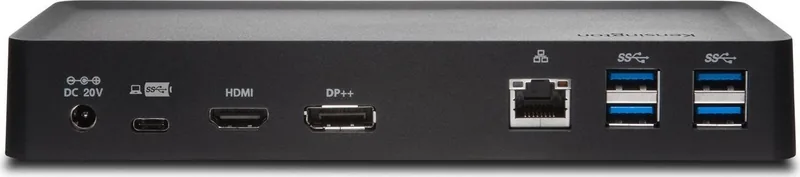
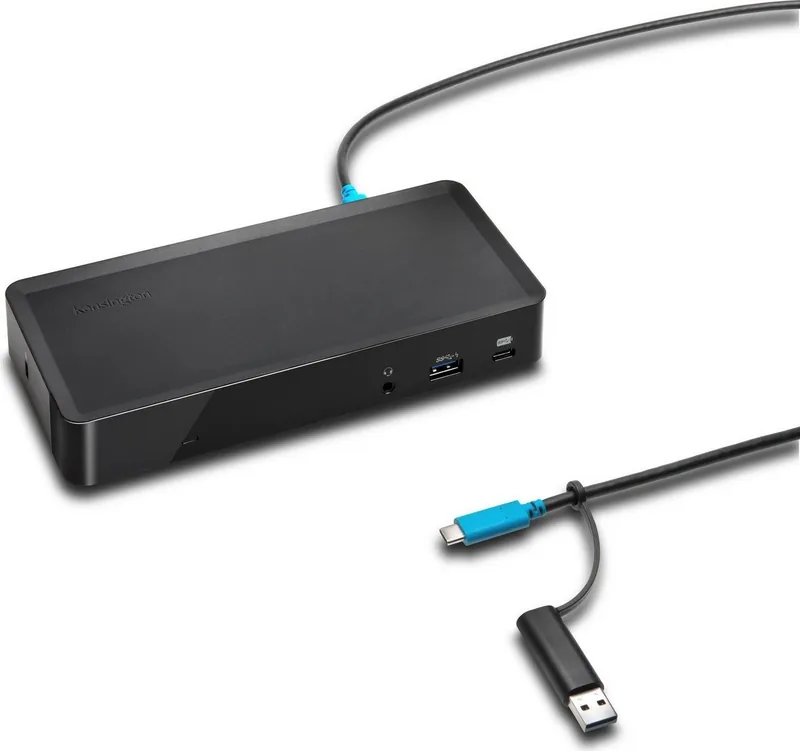
1x USB-C 3.0, 5x USB-A 3.0, 1x HDMI 1.3, 1x DisplayPort 1.1, 1x Gb LAN, 1x ヘッドホン端子
電源
135W, 外部
外形寸法
19.99 x 9.09 x 3.00 cm
重量
0.30 kg
機能
セキュリティロック (ケンジントン), USB-C 給電 (60W)
製品 説明
Introduction to High Performance Docking Solutions
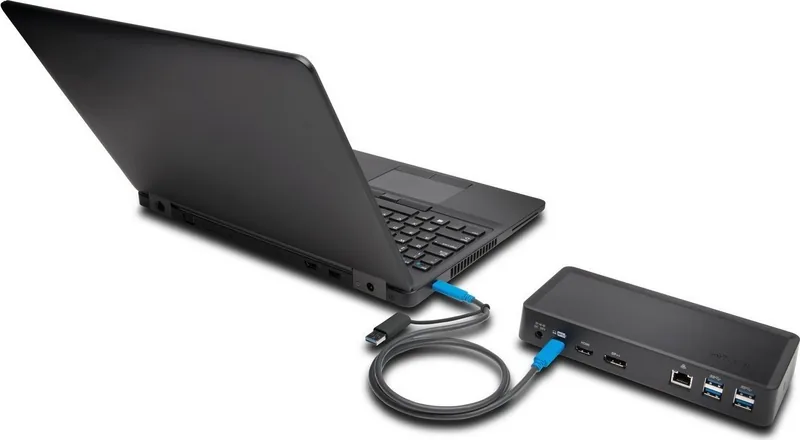
When searching for the perfect setup solution the Kensington SD4700P USB-C 3.0 Universal Dual 2K Docking Station Manual often guides users to the best choice for their workspace. This device offers exceptional value for business and personal use cases alike by reducing cable clutter effectively. It enables users to connect multiple peripherals through a single connection point while maintaining high speeds. The design focuses on minimizing physical mess on the desk while maximizing functionality for the modern distributed workforce.
Detailed Technical Features Overview The hardware supports high speed data transfer through multiple USB 3.1 ports delivering five gigabits per second for efficient file movements. Power delivery is a key feature allowing up to sixty watts to flow directly to the host device. This means your laptop stays powered while you work on other tasks without needing a separate charger. Display capabilities are robust featuring both DisplayPort and HDMI outputs for flexibility. These ports allow for dual screen setups supporting twenty one hundred and sixty resolution levels clearly and vividly.
Operating System Support and Driver Compatibility Windows and Mac systems are the primary targets for this software stack and driver support package. Windows Seven and Ten versions receive full driver support automatically through standard update systems. Mac operating systems starting from Ten point thirteen receive necessary recognition for plug and play operation without complex configuration. Internet connectivity relies on the built in gigabit ethernet port ensuring stable network access during video calls or large file transfers easily.
Setup Considerations and Accessory Needs Some accessories are sold separately to maintain flexibility in purchasing options for different budgets. Security locked covers protect the physical structure from unauthorized removal from the desk surface. Ventilation holes manage heat dissipation to prevent overheating under continuous heavy loads. The compact footprint leaves ample space for other essential items on the workspace surface needed most. Always verify your specific requirements before purchasing add on s to avoid compatibility issues with your existing computer setup.
Global Support and Warranty Information Technical support is available through regional offices globally for any inquiries regarding this unit. The text includes contact numbers for various countries including the United States and European territories for help. Users can register their product on the main website to ensure warranty coverage remains active for the long term. Software updates keep the system secure and performant over time to protect critical data.
User Experience and Workflow Integration Integrating this dock into a daily workflow transforms how users manage their digital assets efficiently. The dual display capability supports multitasking scenarios better than single screen laptops alone. Audio features allow for clear communication during online meetings without external headsets often required separately. USB charging ensures mobile devices stay topped up during long work days seamlessly.
検索: 67,732 オンラインマニュアル


ブランド名またはモデルを入力