Before using thi the sections entitled
UNIT SAFELY” and “IMPORTANT NOTE
These section
operation of the un
Additionally, in order to feel assured that you have gained a good
grasp of every fe
be read in its entirety. The manual should be saved and kept on h
as a conven
A battery is suppli
limited, however, since
Main Fe
TU-3W featur
the true by
High Brightness mode enhance
Accu-Pitc
to show when tuning is
Guitar/Bass mo
for 7-string guitars and 6-strin
Flat
“dow
Switchi
allowin
How to Us
1. Con
INPUT jack. (T
2. Pres
The CHECK indica
3. Play a single
The note
appears in th
Guide ind
(Cent di
The meter
or farther toward
* When the Ac
toward t
is reach
* The m
(the f
STREAM disp
* The s
Conven
Having the Meter In
Tuning (A
When the Accu-Pit
towwhen stable tuning at the correct
pitch is reached.
1. While ho
the power (insert
2. Press the ST
Accu-Pitch Sign function on/off.
On: T
Off: The me
* The TU-3
elapse
* This se
Changing the Referenc
You can adjust the reference pitch
is the factory defau
1. Press the MO
simultaneou
The lowest digi
440 Hz) blinks in the Note Name/St
2. Press
change the
MODE Raises the re
STREA Lowers the reference pi
* If y
button
operati
* When you turn on
disp
* This se
Changing the Meter
(High Brightness mod
By switching t
visibility when performing
To switch t
button for two seconds or lon return
down the STREAM/CENT for two seconds or
* Normal b
power
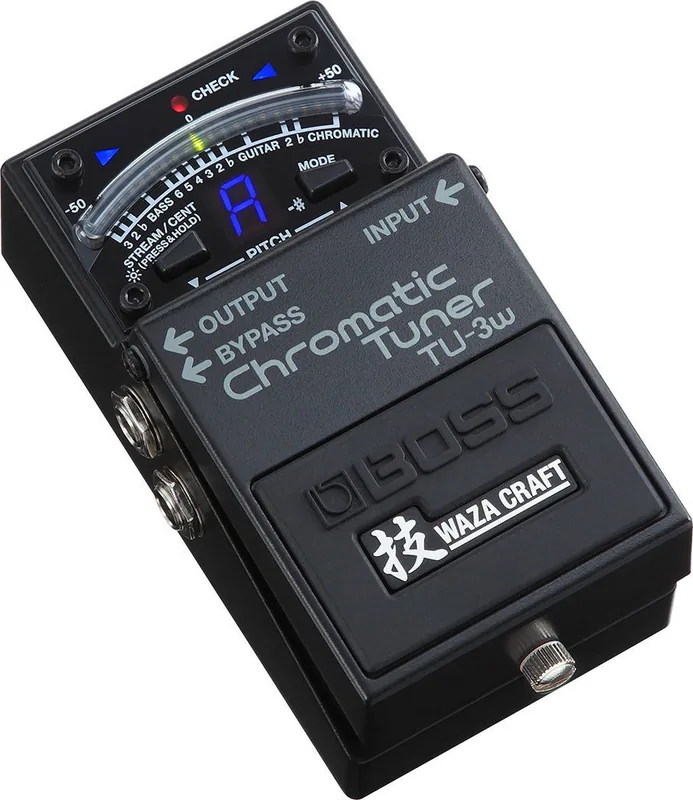
Panel
* If you connect other effect units, you must connect them after the TU-
3W. If
to tune corr
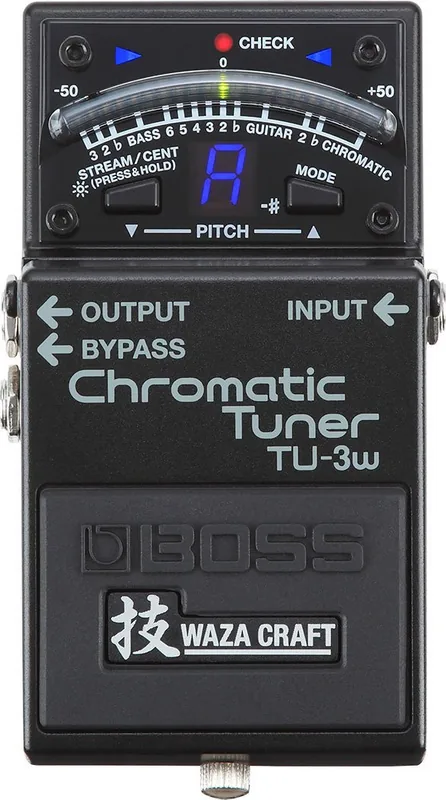
1. CHECK I
This indicator shows whether the effect is on or off, and also
doubles as th
* If
dim—or doesn
batter
changing
2. Tuning Guide Indicator
Indicates w
3. Me
Indicates th
4. STREAM/CENT button
Switches the
* This sett
CENT displ
The me
farther toward the
correct, the c
* The center of t
sever
STREA
The meter
towa
The lights flow more slowly as the pitch
and stop
* Th
selected thi
5. Note Name/Str
Indicates th
Note ind
6. MO
The tuning
The meter
* When you turn on
for se
* This sett
In this ex
7. INPUT Jack
Connect the guiguitar to be
* The INPUT j
on when; the po
cable
8. OUTPU
Connect
here
* The outpu
9. BYPASS Jack
Connect
here
This jack will always output the signal from the instrument
conn
Use this ja
10. Pedal Switc
This switch tu
11. Thumbscrew
When this screw is loosened, the pedal
change th
For instructions on cha
Battery.”
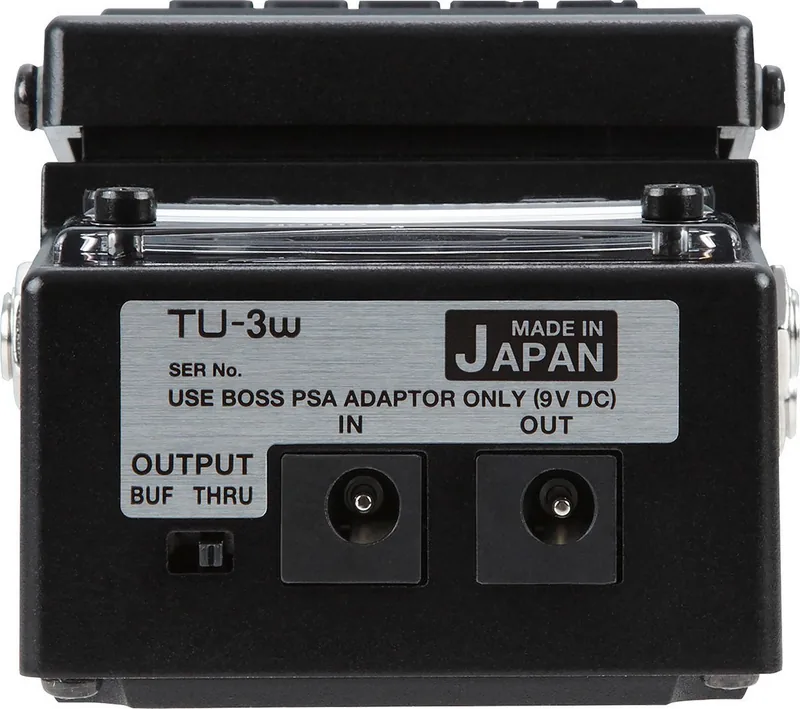
12. DC OUT
When an AC
DC cord (optional) to supply power to effe
PSA adaptor-compatible gear.
* Pow
running on b
13.DC IN
Accepts connection of
using an AC
how much battery power you have left.
* Use on
outl
this may cause malfunction.
* We rec
y
con
accide
14.OUTP
Switches betw
Prec
* To pr
alway
before making a
* Some connec
with
impo
manu
* If y
you u
* Once the
variou
wrong or
and o
When Turn las.
When Tufirst.
* This un
second
nor
* When
dim when ba
possibl
Changin
When the i
it means that the battery must be replaced.
Replace the battery followin
* Please
“IMPO
* Bat
othe
1. Hold
pedal a
the thu
then open t
pedal up
* The pe
opene
deta
thu
2. Rem
battery from
battery housing, and remove the snap cord
to i
3. Connect the snap cor
the battery inside the battery housing.
* Be su
4. Slip the coil sp
the pedal,
* Care
and ba
5. Fi
hole and fasten it
Stor
1. While holding down the STR
Peda
INPUT jack).
The storefront display appears.
The storefront display remains until yo
off and then on
Specificat
TU-3W: C
* Dura
These fi
* The b
use, int
* 5 1 0 0 0 5 0 1 9 7 - 0 1 *
Pitch is flat Pitch is in tun Pitch is sharp
Mode Explanati Indicat
Chromatic
Lets yo
steps of the
The note
displayed.
Chromatic
flat
Lets yo
(b) or two semitones lo
Guitar
Lets yo
num
The guitar string
numb
(7th string is di
as “7.”)
Guit
Lets yo
(b) or
semitones lo
Bass
Lets yo
num
The bass string number
is displayed.
is displayed as “C,” Lo
string is
“b.”)
Bass fla
Lets yo
(b) two semito
three semitones low
Parallel DC C
o PSA adaptor compatible devices
such as compact effect units
Guitar Amplifier
Electric Guitar
(Electric Bass)
AC Adaptor
(PSA series:
1
2
3
8
9
10
11
4
5
6
7
12 13
14
CD
B
G
EF
C
#
(Dot LED lit)
Guitar
Chromatic at
( , 2)
Chromatic
Bass at
( –3)
Bass
Guitar at
( –6)
Tuning R C0 (16.35
Reference Pitch A4 = 43
Tuning A ±1 cent
Nominal Input Level -20 dBu
Input Impe 1 MΩ
Nomin -20 dBu
Output Impedance 1 kΩ
Recomme
Impedance
10 kΩ
Power Supply
Carbon
6LR6
Current Draw
60 mA (
110 mA (DC 9 V,
when High Brightness m
)
Dimensions
73 (W) x 129 (D) x 59 (
2-7/8
Weig
460 g
1 lb 1 oz (includ
Accessori
Owner’
“IMPORTA
batter
Options
AC adapto
Parallel DC
Battery
When t
con
When the t
minut
When H
Bri
mode is off
When Hig
Brightn
mode is on
When H
Brightness
mode is off
When High
Brightness
mode is on
Carbon 0.5 hou 0.2 ho 1 hour 0.5 h
Alkaline 6 hour 3 hour 6.5 ho 6 ho
Thumbscrew
Pedal
Spring Base
Coil Spring
Guide Bush
Hole
Battery Housing
Battery Snap
Cord
Battery
Snap
9V Battery
こ の機器を正 しくお使い いただくた めに 、ご使用前に 別紙 『 安 全
上 のご注 意』と 『使用 上のご 注意』 をよく お読み くださ い。
ま た 、 こ の 機 器の優れ た機能を 十分ご理解 いただくた めにも 、取
扱 説明書をよくお読 みください 。取扱説明書 は必要なときに すぐ
見 ること ができ るよう 、お手 元にお いてく ださい 。
こ の機器には、 工場出 荷時に電 池がセット されていま す 。 こ の 電
池 は動作 確認用 のため 、寿命 が短い 場合が ありま す。
主 な特長
● ト ゥ ル ー ・バイパ ス
/バッ ファード ・ バイパ スを切 り替える 機
能を 搭載して います。
● 高 輝 度 モ ードの 搭載 で、 野外 でのメ ー タ ー 視 認性を 高め ていま す 。
● チュー ニング完了を 光の流れで知 らせるアキュピ ッチ・ サイン機
能を 搭載 してい ます 。
● 弦 番 号 を表示 す るギタ ー /ベー ス ・ モードで は 、 7 弦ギ ター、 6
弦ベ ースにも 対応して います。
● フ ラ ッ ト ・ チ ューニ ング にも 対応し てい ます。 ギ タ ー ・ フ ラット ・
モー ドで は、 最大 6 半 音まで のフ ラッ ト ・ チ ュ ーニン グが 可能で す 。
● チ ュ ー ナ ー・オ ンと 同時に OU T P U T の信 号が 自動 的にミ ュー ト
され るの で、音 を出 さずに チュ ーニ ングが 行え ます。
チ ューニ ングの しかた
1.
チ ューニン グする ギター ( ベー ス) を I N P UT ジャッ ク
に 接続しま す。 (電源 オンに な りま す)
2. ペ ダル・ス イッチ を踏ん で チュ ーナー ・オン します 。
C H E C K イ ンジケ ーター が点灯 します 。
3.
ギタ ー(ベ ース) を単音 で鳴ら し、チ ュ ーニ ングし ます。
鳴ら した音に近 い音名/弦 番号がデ ィスプレイ に表示され ます。
チ ューニ ング ・ ガ イド が両 方点灯 し、 メー ター の中央 が緑 色で 点
灯 するよ うに チュー ニン グし ます。 (CE N T 表 示 )
メ ーター は
入力音 が低い ほど左 が、高 いほど 右が点 灯しま す。
※ ア キュピッ チ ・ サイン 機能が オンの ときは 、 チ ューニ ングが 完了す ると
メーターの光が左右から中央に流れます。
※ S T R E A M 表示のときは、メーター表示のしかたが異なります。
※ チューナー・オン時は O U T P UT ジャックの出力をミ ュートします。
便 利な機 能
■ チ ューニ ング完 了をメ ーター 表示で 知らせ る
( アキュ ピッチ ・サイ ン機能 )
安 定してピッチが合 いチューニング が完了すると、 メーター の光
が 左右か ら中央 に流れ ます。
1. ST R E AM /C EN T ボ タン を 押 し な がら 、 電 源 を オン
( I N P UT ジ ャック にプラ グを差 し込む ) にし ます。
2. 再 度 S T RE A M / C E N T ボ タンを 押して 、アキ ュ ピッ
チ ・サイン 機能の オン/ オ フを 切り替 えます 。
オン :メー ターの 光が左 右から 中央に 流れま す。
オフ :メー ターの 左右が 点灯し ます。
※ S T R E A M/C E N T ボタンを押さずに数秒経過すると、 通常の状態に移りま
す。
※ この設定は電源をオフにしても保存されます。
■ 基準 ピッチ を変更 する
4 3 6 〜 4 45H z の間で 基準ピ ッチを 設定す ること ができ ます。 ( 工
場 出荷時 は 440Hz )
1.
M O DE ボタ ンと S T R E A M / C ENT ボタン を同時 に押し ま
す。
音 名 / 弦 番号 イン ジケ ータ ーに 、現 在の 基準 ピッ チの 1 桁 目
(44 0 H z なら 0) が点滅 表示さ れます 。
2. M O D E ボタ ンまた は S T R E A M /C EN T ボタン を押し
て 、基準ピ ッチを 設定し ま す。
MO DE ボタ ン: 1 H z ず つ 上がり ます。
ST R E A M/ C E N T ボタン : 1 H z ずつ 下がり ます。
※ M O D E ボタンまたはST R E A M/C E N T ボタンを押さずに数秒経過すると、
通常の状態に移ります。
※ 電源をオンにすると、数秒間、現在の基準ピッチが表示されます。
※ この設定は電源をオフにしても保存されます。
■ メ ーター の明る さを切 り替え る(高 輝度モ ード)
メ ーターの明るさを 高輝度表示させ ることで 、野外での視認 性が
高 まりま す。ST R E A M/C E N T ボタ ンを 2 秒以上 押すと 、高輝 度
点 灯させ ること ができ ます。 再度 ST R E A M /C E N T ボタン を 2 秒
以 上押す と、通 常の明 るさに 戻りま す。
※ 電源投入時は通常の明るさで表示します。
各部 の名称 と働き
※ 他のエフェクターを接続するときは、必ず T U-3W の後ろに接続してく
ださい。 T U - 3 W を他のエフェクターの後ろに接続すると、 正しくチュー
ニングできません。
1. C H E C K ( チ ェック )イン ジケー ター
チュー ナー ・ オン/ オフの 表示と 、 バ ッ テリー ・ チェッ クの機
能を兼 ね備え たイン ジケー ターで す。
※ イ ンジ ケータ ーが暗 くな ったり 点灯し なくな った ときは 、 電 池が消 耗し
て います ので 、 新 し い電池 と交換 してく ださ い 。 交換方 法につ いては 、
『電池交換のしかた』をご覧ください。
2. チ ューニ ング・ ガイド ・ イン ジケー ター
チュー ニング の目安 を表示 します 。
3. メ ーター
入力音 のピッ チのズ レを表 示しま す。
4. S T R E A M /C EN T ( ストリ ーム/ セント )ボタ ン
メータ ーの表 示パタ ーンを 切り替 えます 。
※ この設定は電源をオフにしても保存されます。
CE NT 表 示
入力音 が低い ほど左 が、高 いほど 右が点 灯しま す。
ピッチ が合う とメー ターの 中央が 緑色で 点灯し ます。
※ 切 り替え後 数秒 間 、 メ ーター中 央とチュ ーニ ング・ガ イ ド・イ ンジ ケ ー
ターが点灯します。
ST R E A M 表 示
入力音 が低い ときは 左に流 れ、高 いとき は右に 流れま す。
ピッ チのズレが小さくなるほど 、 光 の流れる速さが遅 くなり、
ピッチ が合う と光の 流れが 止まり ます。
※ 切り替え後数秒間、メーターの光が右に流れます。
5. 音 名/弦 番号イ ンジケ ー ター
音名、 弦番号 や基準 ピッチ を表示 します 。
音名表 示
6. M O D E (モ ード) ボ タン
MO DE ボタン を押す 度に、 チュー ニング ・モー ドが切 り替わ
ります 。
現在選 ばれて いるモ ードの 位置で 、メー ターが 点灯し ます。
※ 電 源をオン にす る と 、 数秒間 、 現 在 のチュー ニン グ ・ モ ードが表 示され
ます。
※ この設定は電源をオフにしても保存されます。
例 )チュ ーニン グ・モ ー ドを G U I T A R にした 場 合
7. I N PU T (イン プット ) ジャ ック
チュー ニン グす るギタ ーや ベー ス等の 楽器 を接続 しま す。
※ I N P UT ジャックは、 電源スイッチも兼ねています。 接続プラグを IN PU T
ジャックに差し込むと電源がオンになり、抜くとオフになります。
8. O U T P UT ( アウト プット ) ジャ ック
エフェ クター やギタ ー・ア ンプな どを接 続しま す。
チュー ナー・ オン時 は出力 をミュ ートし ます。
9. B Y P A S S ( バ イパ ス)ジ ャ ック
エフェ クター やギタ ー・ア ンプな どを接 続しま す。
IN PU T ジ ャック の信号 を常に 出力し ます。
チューニング中も音を出したままにしたいとき に使用してく
ださい 。
10 . ペダル ・スイ ッチ
チュー ナー・ オン/ オフの 切り替 えスイ ッチで す。
11 . サム・ スクリ ュー
このサ ム ・ スクリ ューを ゆるめ るとペ ダルが 開き、 電池 の交換
ができ ます。
交換方 法につ いては 、 『電池 交換 のしか た』を ご覧く ださい。
12. D C O U T (D C ア ウト ) ジ ャ ッ ク
A C アダ プター 使用時 に、パ ラレル DC コ ー ド P C S -2 0A (別
売 )を接 続する と、エ フェク ターな どの P S A ア ダプタ ー対応
機 器に電 源を供 給する ことが できま す。
※ 電池動作時には供給できません。
13. DC I N( DC イ ン ) ジ ャ ッ ク
A C ア ダプタ ー(PSA -1 00 :別売 )を接 続する ジャッ クです 。
A C ア ダプタ ーを使 用すれ ば、電池 切れの 心配を せずに 長時間
使 用する ことが できま す。
※ A C アダプターは、 必ず指定のもの (PSA - 100) を、 A C 100V の電源で
使用してください。故障の原因となりますので、指定以外の A C アダプ
ターは使用しないでください。
※ A C アダプターを使用する場合でも電池を入れておくと、 万一製品本体か
ら A C アダプターのコードが抜けても演奏が続けられます。
14. OUT P UT B UF / T HR U ス イッチ
ト ゥルー ・ バ イ パス/ バッフ ァード ・ バイパ スを切 り替え ます。
接続 時のご 注意
※ 他の機器と接続するときは、 誤動作やスピーカーなどの破損を防ぐため、
必ずすべての機器の音量を絞った状態で電源を切ってください。
※ 接続ケ ーブル には 抵抗が 入った もの があり ます 。 抵 抗 入 り のケー ブルを
使用す ると音 が極 端に小 さくな った り 、 まった く聞こ えな くなる 場合が
あります。抵抗の入っていない接続ケーブル(ローランド:P C S シリー
ズなど) をご使用ください。 他社製の接続ケーブルをご使用になる場合、
ケ ー ブ ル の 仕 様 に つ き ま し て は、ケー ブル の メ ー カ ー に お 問 い 合 わ せ く
ださい。
※ 長時間連続して使用する場合は、A C アダプターの使用をお勧めします。
※ 正しく 接続し たら 、 必 ず 次の手 順で操 作して ください 。 手 順を間 違える
と、誤動作をしたりスピーカーなどが破損する恐れがあります。
電源を入れるとき: ギター ・ アンプなどの電源を最後に入れてください。
電源を切るとき: ギター ・ アンプなどの電源を最初に切ってください。
※ この機 器は回 路保 護のた め 、 電源を オン してか らしば らく は動作 しませ
ん。
※ 電池だ けで使 用す る場合 、 電 池が消 耗し てくる とイン ジケ ーター が暗く
なります。早めに電池を交換してください。
電池 交換の しかた
チュ ーナー ・オン 時に C H E C K インジ ケータ ーが暗 くなっ たり点
灯しな くなったと きは 、 電 池が消耗し ています。 次 の手 順で電池
を交 換して くださ い。
※ 電池の取扱いについては、 別紙 『安全上のご注意』 と 『使用上のご注意』
をよくお読みください。
※ 電池の セット や交換 は 、 誤動作 や故障 を防ぐ ため 、 他の機 器と接 続する
前にしてください。
1. ペダル ・ ス イッチ を
押さえな がらサ ム・
スクリューをゆ る
めて、 ペ ダ ルを上 に
開 き ます 。
※ サ ム ・ スクリューは完全に
取り外すことなく、 ペダル
を開けられます。
2. バッテ リ ー・ ケー
スから 電 池を 取り
出し、 電 池ス ナッ
プをは ず しま す。
3. 新しい 電 池を 電池ス ナ ップ に接続 し、バ ッテリ ー・
ケース に 入れ ます。
※ 電池の極性(+/−)を間違えないようにご注意ください。
4. コイル ・ スプ リング を ペダ ル裏の スプリ ング台 座凸部
に 入 れ、 ペ ダ ル を 閉じ ま す 。
※ ペダルやコ イル ・ スプリ ング 、 バッテ リ ー ・ ケースな ど に 、 電池スナッ
プ・コードをはさまないようにご注意ください。
5. サム・ ス クリ ューを ガ イド ・ブッ シュ穴 に入れ 、確実
に締め て くだ さい。
展示 デモ表 示
1.
ST R E AM/C E N T ボタン
とペ ダル ・ ス イッチ を押し なが
ら、 電源を オン ( I N P UT ジ ャック にプラ グを差 し込む )
に し ます 。
展 示デモ 表示が 始まり ます。
電 源を入 れなお すか、 ペダ ル ・ スイ ッチを 踏むま で展示 デモ表
示 を続け ます。
主な 仕様
T U - 3 W:クロ マチッ ク・チ ュ ーナ ー
※ 電池使用時の連続使用可能時間
(使用状態によって異なります)
※ 付属の 電池は 動作 確認用 です 。 電 池 の 寿 命は前 記時間 より 短くな る場合
があります。
商標 につい て
R o l a n d 、 B O SS、 技 WA Z A C R A F T は 、 日本 国およ びその 他の国
にお けるロ ーラン ド株式 会社の 登録商 標また は商標 です。
ピッチが低い ピッチが合っている ピッチが高い
モード 解説
インジケーターの
表示
クロマチック
1 オクターブに含まれる 12 半音全て
の音程でチューニングできます。
音名が表示さ れま
す。
クロマチック・
フラット
♭ (半 音下 げ) 、 2 (2 半音 下げ ) でチ ュー
ニン グで きま す。
ギター
ギターの弦 番号でチュ ーニングで き
ます。
ギターの弦番 号が
表示されます。 (7
弦は 7 と表示
されます。 )
ギター・
フラット
♭ (半音下げ) 、 2 (2 半音下げ) 、 . . .
6 ( 6 半音下げ) でチューニングでき
ます。
ベース
ベースの弦 番号でチュ ーニングで き
ます。
ベースの弦番 号が
表示されま す 。
(H i-C 弦 は C 、
L o - B 弦は b と
表示されます。 )
ベース・
フラット
♭(半音下げ) 、2(2 半音下げ) 、3
(3 半音下げ) でチューニングできま
す。
パ ラ レ ルDC コ ー ド (PCS-20A : 別売)
A C アダ プター
(PSA-100 : 別売)
ギタ ー ・ アン プ
エレ キ ・ ギタ ー
(エ レ キ ・ ベー ス )
コン パ ク ト ・ エフ ェ ク タ ー など の
PSA ア ダ プ タ ー 対 応 機器へ
1
2
3
8
9
10
11
4
5
6
7
12 13
14
CD
B A
G
EF
C
#
(ド ッ ト LED点灯)
測定範囲 C 0(16. 35H z)〜 C 8(4, 186H z)
基準ピッチ A 4 = 436 〜 445H z (1H z ステップ)
測定精度 ±1 セント
規定入力レベル -20d Bu
入力インピーダンス 1MΩ
規定出力レベル -20d Bu
出力インピーダンス 1kΩ
推奨負荷インピーダンス 10kΩ 以 上
電源
マンガン電池 (9V 形 ) /アルカリ電池 (9V 形 ) 、
A C アダプター(別売)
消費電流
60m A ( DC 9V)
110mA ( DC 9V、高輝度モード・オン時)
外形寸法 73(幅)×129(奥行)×59(高さ)mm
質量 460g (乾電池含む)
付属品
保証書、 取扱説明書、 チラシ (安全上のご注意/
使用上のご注意/サービスの窓口) 、アルカリ電
池(9V 形 ) ;本体に接続済み
別売品
A C アダプター:PSA - 100
パラレル DC コード:PC S -20A
電池
連続チューナー・オン時
1 分間チューナー・オン、
3 分間チューナーオフ時
高輝度モー
ド・オフ時
高輝度モー
ド・オン時
高輝度モー
ド・オフ時
高輝度モー
ド・オン時
マンガン 約 0 . 5 時間 約 0 . 2 時間 約 1 時間 約 0 . 5 時間
アルカリ 約 6 時間 約 3 時間 約 6 . 5 時間 約 6 時間
Vo r dem Bet r i e b des Ger ä t e s lesen S i e b i t t e di e f o lgen den au f g ef ü h r t en A b sc h n i t t e
s o r g f ä l t i g d u r c h : „ S I C HE R E R B E T R I E B D E S G E R Ä T E S“ u n d „ W I C H T I G E HI N W E I S E “ ( a uf
ei n e m ges o n d er t e n Blat t b e i l i e gen d). Di ese A b sc h n i t t e en t h alt e n wi c h t i ge
In f o r m at i o n e n ü b er di e k o r r ek t e Bed i en u n g des G e r ä t e s.
U m einen vo llst ä n d i gen Ü b er b l ic k üb er a l l e F u nk t i o n en d e s G e r ä tes z u er ha lten ,
so llt en S i e di e s e Be di en u n gsan lei t u n g vo ll st än di g d u r c h l esen . Be w a h r e n S i e di e
A n lei t u n g an ei n e m si c h er en P l at z au f u n d ver w e n d en S i e di ese z u
R e fe re n zzw e c ke n .
Im L i ef er u m f a n g des Ger ä t e s i s t ei n e Bat t e r i e en t h alt e n . Di e L e b e n s dau e r di eser
B a t t e ri e ka n n je d o ch e i n g e s c h r ä n k t s e i n , d a i h r H a up tz w e ck d a ri n be s t e h t ,
P r od uk tt e s t s z u e r m ö g l i c h e n .
Die wic h ti gsten Featu r es
D e r TU-3 W er mö g l i c h t das Ums c h a l t e n z w is c h en " T r u e B y pas s "
und " B uff e red B y pas s " .
High Bright ne ss- Mo d u s v e rb e sse rt d i e Sich tb a r ke it d e r
To nh ö h enanz e ige be i Tageslicht im F r eie n .
Acc u Pi t c h- F u nk t i o n , d i e mit Hilfe e i ne s o p t i s c he n S i gna l s d a s
Erre iche n d e r k o r r e k t e n To nhö h e a n ze igt .
Mit d e m G u it a r / B a ss- Mo d u s k a nn na ch S a it e nnumme rn (s t a t t
No t e nna me n) ge st immt we r d e n , wo be i 7 - s a it ige G i t a rren und
6- sa itige Bä sse u n te rst ü tzt we rd e n .
D e r Guit ar Fl at -M odus er mö g l ic h t „t ie fer e “ S t immun g en um b i s
zu se chs Ha lb t ö n e unt e r d e r S t a n d a rd st immung für z.B .
Ha rd ro c k und H e a v y Me t a l.
Be im Einscha l t e n d e s Stim m g e r ä t s wird d a s Au sga n gss i gna l
a u to m a t i sch stu m m g e s c h a l te t, so d a ss Sie s t im m e n k ö nn e n ,
o h n e den K l an g aus z ug eben .
Verwend u ng des St im m g erät s
1.
Sc hließen Sie d i e Git a rr e b z w . d e n Ba s s , an d i e INP U T-
B u chse a n (b ei Bat t er ieb e t r ieb wi rd d e r T U - 3 W
d a d u rch au ch e i ngeschal t e t ) .
2. D r ü cken Sie d e n Fu ßschalt e r, u m d a s St imm g erät
e i nzuschal t e n.
D i e C H E C K - A n zei g e l e ucht et auf .
3. Sc hl agen Si e ei nen ei nzel nen T o n a u f Ihr e r G i t a r r e
o d er Ihrem Bass an u n d st imm e n Si e.
D i e Ton b ezei chnu ng od er d i e S a i t enn u m m er d e s Tons, d e r d e m
ge s p ie lt e n Ton a m n ä c h s t e n is t , e r s c h e i n t im Dis p l a y . St im me n Si e
das Inst rum e n t so lang e, bi s bei d e Pfei le der R i ch tanze i g e leuc hten
u n d d i e m i ttl ere L E D d e r Tonh öhenan zei g e g r ün aufl euc h tet
( C ent - A n ze i g e) .
D i e Tonh öhen anzei g e b e w e g t si c h w e i t er n a ch l i nks, j e m e hr d i e
T o nh ö h e s i nk t bz w . w e i t er n a c h r e c h ts , j e me h r d i e T o nh ö h e s t e i g t .
* W e nn d i e Ac c u P i tc h-Fu nk ti o n e i ng e s c h a l te t i s t, g i b t e s na c h E r r e i c he n
d e r k o r r e k te n T o nhö he e i n o p ti s c he s Si g n a l : V o n l i nk s u n d r e c h ts l a u f e n
zwe i L i c h t e r in d i e Mi tte .
* D i e T o nhö he na nz e i g e v e r h ä l t s i c h wi e b e s c hr i e b e n, we nn d i e CEN T -
A n ze ige au s g ewä h lt is t ( W er ks ei n s tel l u n g) . Bei A u s w ah l der STR E A M -
A n ze ige i s t d a s Ver h al ten an de rs .
* Ü b e r d i e O U TP UT - B uc h s e wir d ke in K l an g a u s g eg eb en , wen n d a s
Sti mmge r ät e i ng es c h alte t is t.
P r aktisc he Fu nktione n
V e rw en den der Ton h öh en an zei g e, u m da s En de de s
St im m v o r ga ng s an z u z e ig en ( A c c u P i t c h- Fu nkt i o n )
Wen n d i e A c c u P i tch- F u nkt i o n ei ng escha l t e t i s t, g i bt es nach E rrei c hen
der korrekt en Tonhöh e e i n opti sch e s S i g n al : V o n li nks und recht s
l a ufen zw ei L i chte r i n d i e M i tte .
1.
S c h a lte n S i e da s Ger ä t bei g e dr ü c k t e r S T REA M / C ENT-Ta ste
ei n ( s ch l i eß en S i e ei n Kab e l an der IN PU T-B u ch se an ).
2. D r ü cken Sie d i e ST RE A M /C E N T - T a st e , u m d i e A ccu -
P i t c h- Si gnalf u nkt i on ein- u n d au szu s chal t e n.
Ei n : D i e L E D s d e r Tonh öhena n zei g e bew e g e n si ch von l i n k s un d
rec h ts z u r M i t t e.
Au s : D i e Tonh öhen anzei g e l e uchte t l i nks und rec h ts auf.
* D a s T U -3 W s c ha l t e t i n d e n no r m a l e n Be tr i e b zu r ü c k , we nn me hr e r e
Sek u n d e n v e r g e h en , oh n e da s s di e STR E A M / C EN T - Ta s t e ge dr üc kt wi rd .
* D i e s e E i ns te l l u ng b l e i b t a u c h d a nn g e s p e i c h e r t, we nn d a s Ge r ä t
au s g e s c h al tet wi rd .
Än de r n de r R e fe re n z t o n h ö h e
Di e R e fe re n z -F re que n z i s t von 438 bis 445 H z ve rst e l lbar (W e r k s e i t i g
sin d 440 Hz e i n g e s t e ll t ) .
1. D r ü cken Si e gleichz e it ig d i e Ta s t en MO D E u n d
ST R E A M /C E N T .
D i e l e t z te Zi ffe r der aktue l len Refe renzton h öhe ( z .B . „ 0 “ be i d e r
Ein s t e l l un g von 440 Hz) bli n k t i m Display .
2. D r ü cken Sie d i e MO DE - od er STR E A M /C E N T- Tast e zu r
Ä n d e r u ng d e r R e fer e nzt o nhö he .
MO D E - T a s t e : E r hö h t d i e Re f e r e nz t o n h ö h e u m 1 H z .
S T R E A M / C ENT-Tas t e: S e n k t d i e Refere nz to nh ö h e um 1 H z .
* W en n S i e d i e MO DE - od er ST RE A M / C E N T- Ta s t e m e h r e r e S e k u n d e n la n g
ni c h t d r ü c k e n, s c ha l t e t d a s T U -3 W wi e d e r i n d e n no r m a l e n Be t r i e b .
* B e i m E i n s ch al t e n d e s G e rä t s w i r d d i e ak tu el l ei n g e s t e ll t e
R e f e r e n z to nh ö h e f ü r me hr e r e Se k u nd e n a n g e ze i g t.
* D i e s e E i ns te l l u ng b l e i b t a u c h d a nn g e s p e i c h e r t, we nn d a s Ge r ä t
au s g e s c h al tet wi rd .
He l l i gk ei t d e r T o nhö hena nzei ge änd e r n
(Hi g h Br i g ht ne ss - M o d us)
D u rch U m sch a l t en d e r T o n h ö h en anz e i g e i n d e n H i g h Bri g htne ss-
M o dus könn en S i e d e ssen S i c h tbark e i t bei d e r V e rwen d u ng des G e rät s
bei Tag e sli c ht i m Fre i en verbe ssern.
U m i n d e n H i g h B r i g h t ness- M o d u s z u schal t e n , h a l t en S i e d i e S T R E A M /
C E N T - T a s te m i n d e s tens z w ei S e ku nd en l a n g g e d r ü c kt . Um a u f no r m a l e
Hel l i g k ei t zurückzu schal t en , h a l t en S i e d i e S T R E A M /C E N T-Tast e erneut
m i n d e s tens z w ei S e kund en l a ng g e d r ückt.
* B e i m E i ns c h a l t e n d e s Ge r ä ts i s t i m m e r no r m a l e H e l l i g k e i t e i ng e s te l l t.
B e schr eibu ngen zu m B e di enfel d
* W en n Si e we iter e E f f e kt ge rä te ve rw en d e n m ö c h te n , m ü s s en Si e d i es e
na c h d e m T U -3 W v e r k a b e l n. W e nn s i c h d e r T U -3 W zwi s c h e n a n d e r e n
P e d a l e n be fi n d e t b z w . a m E n d e de r Ef fe kt ke t t e an ge o r d n et i s t , is t ei n e
ko rr ek te S t im m u n g n i c h t m ö gl ic h .
1. CHE C K- An z e i g e
A n h a nd d i eser A n zei g e erke nnen S i e, ob d e r E ffe kt ei n- od er
ausg esch al tet i s t, und d a rübe r hi naus d i en t si e al s K o ntro l l e d e r
B a tte ri es pannun g .
* W enn Sie d a s G e rä t m i t eine r Batt er ie b e tre i b e n u n d d i e CH EC K- A n zei g e
s c h w äc h e r w i rd – od er g a r k e i n L i c h t z u s e h e n is t – , s o ba ld S i e
v e r s u c he n, d e n Ef f e k t e i nzu s c h a l te n, i s t d i e Ba tt e r i e f a s t l e e r u n d mu s s
er s e tzt wer d en . A n we is un g e n zu m A u s w e c h s el n der Batt er ie fi n d e n Sie
im Ab s c hnitt „ A u s wec h s e ln d e r Ba tte rie “ .
2. Ri c h ta n z e i g e
Ze i g t a n , wen n di e ri cht i g e S t i m m u n g e rrei c ht i s t .
3. T o nhö henanz ei ge
Ze i g t d i e Ton h öhe d e s g e spi e l t en Tons an.
4. S T R E AM / C E N T- Ta s t e
U m schalten der Ton h öhen anzei g e .
* D i e s e E i ns te l l u n g b l e i b t a u c h d a nn g e s p e i c h e r t , we nn d a s Ge r ä t
au s g es c h alt e t wir d .
C E N T - A n z ei g e ( k l a s s i s c h e A n z e ig e)
D i e L E D s d e r Tonh öhenan zei g e be w e g e n si c h w e i t er nac h l i n k s, je
m e hr d i e T o nh ö h e s i nk t bz w . w e i t er nach rech ts, j e m e hr d i e
T o nh ö h e st ei g t . W e nn d i e T o nh ö h e ri chti g i s t , l e uchte t d i e LE D i n
d e r M i tt e d e r T o nhö he nanz ei g e grün auf.
* D i e L E D i n d e r M i tt e d e r T o nhö he na nz e i g e u n d d i e P f e i l e d e r
R i c h ta nze i g e l e u c hte n no c h e i ni g e Se k u nd e n , na c h d e m Si e d i e s e
Ei ns te l l u ng a u s g e w ä h l t ha b e n.
S T R E A M - A n z eig e ( L aufl ic h t )
Die L E Ds de r An ze ig e b e we ge n sic h a l s L a uflic h t n a c h lin k s, we n n
d i e g e spi e l t e Tonh öhe zu ti ef i s t, od er n a ch re chts, w e nn si e zu
ho c h i s t .
D i e L E D s be w e g e n si ch lang sam e r, wen n di e
T o nh ö h en abw e i c hung z u r r i ch ti g e n S t i m m u ng abni m m t un d
bl ei ben steh en, w e nn d i e exakt ri chti g e Tonh ö h e e rrei c h t w u rd e.
* D i e L E D s d e r T o nhö he na nz e i g e b e w e g e n s i c h f ü r me h r e r e Se k u nd e n
na c h l i nk s , w e nn Si e d i e s e E i ns te l l u n g a u s g e w ä h l t h a b e n.
5. T o nb ez eichnu ngs- /Sa i t e n n u m mer n - D i s p l ay
Ze i g t d i e Ton b ezei chnun g /S ai tenn um m e r od er d i e
R e ferenz t o nhö h e an .
No te n- Anz e ige
6. MO DE - T as t e
B e i j e dem D r ück e n der M O D E -Taste wi rd ei n anderer S t i m m m odus
ei ng este l l t.
D i e A n zei g e l e uch t et an d e r Posi ti on d e s ak tuel l ausg e w ähl t en
Modu s a u f .
* B e i m E i nsc h a l t e n d e s Ge r ä ts wi r d d e r a k tu e l l e i ng e s te l l te St i mmmo d u s
fü r m e h r er e Sek u n d e n a n ge zei g t.
* D i e s e E i ns te l l u n g b l e i b t a u c h d a nn g e s p e i c h e r t , we nn d a s Ge r ä t
au s g es c h alt e t wir d .
I n d i es em Beis piel i s t d e r S t immmo d u s a u f G U I T AR einges t e llt .
7. INP U T - B u ch s e
S c hl i e ß e n S i e hi er ei ne Gi tarre o d er e i ne n B a ss z u m S t i m men an.
* D ie I N PU T - B u ch s e f u n g ie rt auß e rd em al s E I N - / A U S - S c h al t e r . Da s G e rä t
s c ha l t e t s i c h e i n, w e nn Si e e i n Ka b e l a n d e r I N P U T - Bu c h s e a n s c hl i e ß e n,
u n d e s sch a l t e t si ch a u s, so ba l d S i e da s Ka b e l h e ra us z i e h e n .
8. OU TPU T - B uc h s e
S c hl i e ß e n S i e hi er e i n e n E ffek t pro z esso r, ei nen G i t a rrenv erst ärker
od er ei n äh nl i c h e s G e rät an.
* D e r Au s g a n g i s t s t u m m g e s ch a l te t, w e nn d e r E f f e k t e i ng e s ch a l te t i s t.
9. BY P A SS- Bu chse
S c hl i e ß e n S i e hi er e i n e n E ffek t pro z esso r, ei nen G i t a rrenv erst ärker
od er ei n äh nl i c h e s G e rät an.
D i ese B u chse g i bt i m m e r das S i g n al des m i t der E i ng ang s buchse
verb undene n Ins t rum e nts aus.
V e rwe n de n Sie di e s e Buch s e , w e n n wäh r e n d de s St im m e n s de r
K l ang ausg eg e b en w e rd e n soll.
10. Fu ß s c h al t e r
D i eser S c h a l t er sch a l t et d e n E ffekt ei n/aus.
11. Sc hr aube
W e n n Sie di e s e S c h r aube löse n , l ä sst das Pe dal si ch öffn e n , un d Si e
k ö nnen d i e B a tteri e w e chsel n .
A n w e i s ung e n z u m A u s w e c hsel n d e r B a tter i e fi n d e n S i e i m
A b sch n i t t „ A uswechse l n der B a tt eri e “ .
12. DC -OU T -B uc h s e
B e i V e rw en d u ng ei n e s N e tzad apter s könn en S i e ei n
St r o mv e r t e ile r k a b e l BO SS PC S-20a ( a ls Z u b e h ö r e r h ä lt li c h )
verw en d e n, um w e i t er e E ffektg e rät e ( d i e auch ei n PS A -
Ne tz ad apter benö t i g e n) mi t S t ro m z u v e rso r g e n.
* W e nn d e r T U -3 W mi t Ba t t e r i e n b e tr i e b e n w i r d , k ö nne n a n d e r e Ge r ä te
n i ch t ü b er d i e D C O U T- Bu c h s e m i t Str o m ve rs or gt we rd en .
13. DC I N - B u c h s e
E r m ö g l i c h t d e n A n schluss ei nes Net z adapters ( P S A -S eri e : als
Zube hö r erhäl t l i ch). We nn S i e ei nen Net z ad a p ter benut z en,
brauch en S i e si ch ke i n e G e d a nken über d i e rest l i che L e be nsd a uer
de r Bat t e r i e zu m a ch e n .
* V e r we nd e n Si e a u s s c h l i e ß l i c h d e n a n g e g e b e ne n N e tza d a p te r ( P SA-
S e ri e) , u n d s c h l i e ß e n Si e d i e s e n an ein e N e tz s t ec kd os e d e r r i c h tig e n
Sp an n u n g an . Ve rw e n de n S i e ke i n en an d e r e n N e t z a d ap te r, da
h i e r d u r c h Fe hl f u nk t i o n e n a u f t r e t e n k ö nne n.
* E s wir d em p f oh le n , di e B a tte ri en im G e r ä t zu la s s e n , s e lbs t wen n d i es es
ü b er d e n N e tz ad ap te r m i t S t ro m ve rs or gt w i rd . A u f d i e s e W e i s e kö n n e n
S i e e i nf a c h we i t e r s p i e l e n, we nn d a s Ka b e l d e s N e tzt e i l s v e r s e h e n tl i c h
vo m G e r ä t ge tr e n n t w i r d .
14. OU TP U T B U F / T H RU -S c h a l te r
S c hal t et zw i s chen " T ru e B y pass" un d " B uffere d B y pass" um .
Vo r s ic h t s m aß nah m en bei m H e r s t e ll en der A n s c hl üss e
* U m Fe hl f u nk t i o n e n u n d / o d e r Sc hä d e n a n L a u t s p r e c h e r n o d e r a n d e r e n
G e r ä te n zu v e r m e i d e n, r e g e l n Si e s t e t s d i e L a u t s t ä r k e he r u nte r u n d
s c h a lt e n S i e al l e Ge rä t e au s , b e v o r S i e Ve rb in d u n g en h e rs t e l l e n .
* E i n ig e A n s c h l u s s k ab el en t h al t e n W i d e r s t ä n d e. Di e V e r w e n du n g vo n
An s c hl u s s k a b e l n mi t Wi d e r s tä n d e n k a nn d a zu f ü hr e n , d a s s d e r
S i g n a l p e g e l s e hr ni e d r i g o d e r s o g a r u n hö r b a r i s t. Fü r I n f o r m a t i o ne n
ü b e r d i e te c hni s c he n D a t e n I h r e r Ka b e l we nd e n Si e s i c h a n d e n
j e we ili gen H e r s t e ll er .
* W en n Si e da s TU- 3 W fü r ein e län g er e D a u e r be n u t z en , w i rd di e
V e r w en d u n g ei n e s N e tzad ap ter s e m pf oh l e n .
* S obald Si e al le A n sc h l üs se v o rgen o m m e n h a ben , s c h a lt en Sie al le
be t e il igt e n G e r ä t e in de r an ge ge be ne n Re ih e n fo lge e i n. We n n Sie die
G e r ä t e i n der f a l s c h en Rei h en f o l g e ei n s c h al t e n , bes t eh t di e G e f a h r von
Fe hl fu nk t i o n e n u n d / o d e r Sc hä d e n a n La u t s p re ch e r n u n d a n d e r e n G e rä t e n.
Be im E i ns c h a l t e n :
S c h a l t en S i e den G i t a r r en v e r s t ä r k er
zul e tzt e i n
.
Be im A u s s c ha lt e n :
S c h a l t en S i e den G i t a r r en v e r s t ä r k er
zue r st aus
.
* D i e se s G e rä t i s t mi t e i n e r S c h u t z sch a l t un g a u sg e s t a t t e t . Na c h de m
E i ns c h a l t e n e n ts te ht e i n e Be tr i e b s p a u s e v o n e i ni g e n Se k u n d e n b i s d a s
G e rä t n o rm a l ar be i t e t .
* B e i au s s c h l i e ß l ic h e m B a t t e ri eb et r i e b w i rd di e A n z e i g e a m Ge rä t
z u ne hme n d d u n k l e r , s o b a l d d i e Ba t t e r i e s p a nnu ng zu s e hr a b s i nk t.
Er s e tz e n S i e di e B a t t e r i e s o ba ld w i e m ö g l i c h .
A u swech s el n der B a tter i e
Wenn d i e A n z e i g e b e i e i ng esch al tetem E ffekt sch w ächer w i rd o d e r gar
kei n L i c h t m e h r zu se hen i s t , m u ss d i e B a tte ri e erset z t w e rd en .
G e he n S i e hi er f ü r w i e f o l g t v o r .
* I nf o r m a ti o n e n z u r H a n d ha b u ng d e r Ba t t e r i e f i nd e n Si e i m
In fo r m a t io n s b l a t t "S IC H E R H E I T S HI NW E I S E " un d "W IC HT IG E HI NW EI S E " .
* B eim Ein s e t zen od er A u s t au s c h e n d e r Bat t er ie n s o ll ten Sie d i es es G e r ä t
i mme r a u s s c h a l t e n u n d d i e V e r b i n d u ng e n zu je g l i c he n a n d e r e n
a n g e s c hl o s s e ne n Ge r ä te n tr e nne n . Au f d i e s e We i s e v e r m e i d e n Si e
Fe hl f u n k ti o n e n u n d Be s c hä d i g u ng e n .
1.
H a l t en Si e d a s
Pe d a l na ch unte n
ged r ück t , und
lö s e n S i e di e
Schr a u be , d a nn
l ä sst si ch d a s Pe d a l
n a c h ob en öf fn e n .
* U m da s P e da l z u
ö f f n en , m ü s s e n S i e d i e
S c hr a u b e ni c h t
k o m p le tt lö s e n .
2.
E n tn eh m e n Si e di e al te B a tteri e au s d e m B a tteri eg eh äu se,
u n d n e h m en S i e da s d a r a n b e f e sti g te Cl i p kab e l ab .
3. Bef e st igen Sie d a s C l ip kab e l a n d e r n e u e n Bat t eri e ,
u n d le gen Si e d i e Bat t er ie in d a s Bat t eri e gehäu s e ein.
* A c h te n Sie au f d i e P o la ri tät d e r Ba tte rie ( + b z w. - ) .
4. Schie b e n Sie d i e Sp i r alf e d e r au f d i e Fed e rb asis au f d e r
Rü c k s e i t e de s Pe da l s , un d sc h l i e ße n Si e da s P e d a l .
* A ch t e n S i e da ra uf , da ss da s C l ip ka be l n i ch t im P e d a l , in de r S p ir al f e d e r
od er i m B a t t e ri eg e h ä u s e ei n g e k l e m m t w i r d .
5. Führ e n Si e d i e Schr aube schl i e ßl i c h i n d a s
Fü hru n gslo ch e i n, u n d d r ehen Sie sie f e st .
“ L ig htshow” zu Demonst r ati o nszw ec ken
1.
Schal t en Si e das G e r ä t bei ge d r ü c k t er ST R E A M /C E N T -
T a st e u n d ged r ü c kt em Fu ßschalt e r ei n (schli eßen Sie
ein Kab e l an d i e INP U T - B u chse an).
TU -3 W zei g t selbststän di g ve r s c h ie de n e St im mv or g ä n g e zu
D e m o nstrat i o n s z w e c ken an.
D i e s e " L i g htsh ow " bl e i bt ak ti v, bi s S i e d e n TU -3 W aus- und w i ed er
ei nsch al t e n o d e r bi s S i e d e n Fuß s ch al t e r d r ück e n.
Te c h ni s c h e D a t e n
TU- 3 W : C h rom ati c T u n e r
* D a u er d e r k o n t i n ui er li ch e n N u t z u n g im Ba t t e r ie be t r i e b :
D i e s e We r t e v a r i i e r e n je na c h d e n ta t s ä c hl i c he n Be tr i e b s b e d i ng u n g e n .
* D i e m i t g e l ie fe r t e B a tt e r i e is t n u r z u r vo rü be rg eh e n de n Nut z un g
v o r g e s e h en . I h r Hau p tzwe ck b e s t eh t d a r i n , ein e n T e s t des Ger ä ts z u
e r mö g l i c he n.
Deutsch
B edienungsanleitung
To nh ö h e z u ni ed r i g T o nhö he r i c h t i g T o n h ö h e z u ho ch
M o dus E rlä u t e ru n g An z e i g e s t a t u s
Ch roma t i c
H i er m i t k ö n n en S i e al le 1 2
H a lb t ö n e ei n e r O k t a ve s t i m m e n .
D e r N o te n n a m e w i rd
an gez e i g t .
Ch roma t i c
fl a t
H i er m i t k ö n n en S i e ei n e n ( b ) b z w .
z w ei (2 ) H a l b t o n s c h r i t t e t i ef er
st im me n.
Gui t a r
Er mö g l ic ht d a s S t i m m e n na c h
Gi ta r r e n -S a i te n n u m m e rn .
D i e N u m m e r de r
G i t a r r en sai t e wi r d
an g e ze i g t (7 . S a i t e w i rd
a ls „ 7 ” a n ge z e igt) .
G u i t ar f l at
H i er m i t k ö n n en S i e ei n e n ( b ) b z w .
z w ei b i s sec h s ( 2 - 6 )
H a lb t o n s c h r i t t e t i ef er st i m m en .
Bas s
Er mö g l ic ht d a s S t i m m e n na c h
Bass- S a i t en n u m m er n .
D i e N u m m e r de r
B a sssa it e wir d a n gez e i g t
( D i e ho he C- Sa i t e w i r d
a ls „ C ” a n ge z e ig t, d i e
tief e H - S a ite wir d a ls „b ”
an gez e i g t ) .
B a ss f l a t
H i er m i t k ö n n en S i e ei n e n ( b ), z w ei
(2 ) o d er dre i (3 ) H a l b t o n s ch ri t t e
t i ef er s t i m m e n .
V e r t eilerkabel (PCS-20A: optional)
Netzadapter
(PSA-S erie
: optional)
Gitarr e n v erstärk e r
E-Gitarr e
(E-Bass)
Für mit dem PSA-Netzadapt er
kompatible G erät e wie z. B . kompakt e
Eff ekt gerät e
1
2
3
8
9
10
11
4
5
6
7
12 13
14
CD
B A
G
EF
C
#
(P unkt-LED
leucht et =
Halbt on
höher)
Guitar
Chr oma tic a t
( , 2)
Chr oma tic
Bass a t
( –3)
Bass
Guitar a t
( –6)
St i mmbe r e i c h C 0 ( 16, 35 H z ) – C 8 ( 4 . 186 Hz )
R e fe r e nz to nh ö h e A 4 = 43 6– 44 5 Hz ( i n Sc hr itt e n v o n 1 H z )
St i mmge n a u i g ke i t ± 1 Cent
N o mi n e ll e r
Ein g a n g spe g e l
-2 0 dBu
Ein g a n g si m p e d a n z 1 M Ω
N o mi n e ll e r
A u s g an gs p e ge l
-2 0 dBu
Au sg a n g s i m pe d a n z 1 k Ω
Em pf oh le n e
La st im pe da n z
mi nd e s te n s 1 0 k Ω
St ro mv e r s o rgun g
K o hle - Zin k - B a t t e r i e ( 9 V , 6 F 2 2 ) , A l ka li ba t t e r ie ( 9 V, 6LR 61) ,
Net z adap t e r (o p t i o n a l )
Durc h f lus s s t rom
60 mA ( D C 9 V )
110 mA (D C 9 V, we nn d e r High B r ig htne ss-M o d u s e i nge s c h a l t e t
ist )
Abm e ssu n g e n 7 3 (B) x 1 2 9 (T ) x 5 9 ( H ) m m
Ge wi c h t 46 0 g ( e in s c h l i e ß l ic h B a t te r i e )
Be ige f üg t e s Z u b e hö r
Bedi en u n gs an l e i t u n g, Fal t b l at t ( „ S I CH E R E R BE TR IE B DE S
G E R Ä T E S“ , „ W I C HT I G E HI N W E I S E “ u n d „ I n f orm a t i o n e n “ ) ,
A l ka l i ba t t e r ie ( 9 V , 6 L R 6 1 )
Opt i on e n
Net z adap t e r: P S A - S e r i e
Ver t ei ler k ab el : Bo ss P S C- 2 0 A
Ba tt e r i e
W e n n da s St i mmge r ä t
d a uer h af t ei nge s c h al t e t i s t
Wen n d a s S t i m m g er ät ei ne
Mi nu te l a ng e i n- un d d r ei
Mi nu ten l a ng aus g e s ch al tet i s t
Wen n der Hig h
B r ig h t n e ss-
Modu s
au sg esc h altet i s t
W e nn d e r H i gh
B r ig h t n e ss-
Mod u s
ei n g esc h alt e t i s t
W e nn d e r H i g h
Br i g ht ne s s -
Mo du s
au sg esc h a l tet i s t
Wen n der Hig h
B r ig ht ne s s -
Modu s
ei n g esc h altet i s t
Koh l e 0. 5 St und e n 0 . 2 St un d e n 1 S t u n d e n 0 . 5 S t u n d e n
Alk a li 6 S t u n d e n 3 S t u n d e n 6 . 5 St un d e n 6 St un d e n
Schraube
Pedal
Federbasis
Spiralfeder
Führungsloch
Batteriegehäuse
Batterieclipkabel
Batterieclip
9-V-Batterie
A v an t d ' u t i l i s er c e t ap p a rei l , l i s e z at tent ivemen t les sec t i o n s sui v a n tes: «
CO NS IG NE S D E S É CU RITÉ » et « RE M A RQ U E S IM P O RTA N TE S » ( f o u r n ies
sép a r é ment ) . Ces sec t i o n s fo ur niss e n t d ’ imp or ta n t e s in fo rm a t io ns r e la ti v e s a u bo n
fo nc tio nne m e nt d e l’ a p p a r e i l .
En ou tr e , po ur v o us g a ra nt ir la ma ît ri se p a r f a i te d e s d i ff é r e n t e s f o n c t i o n s
p r o p o s ées p a r vo t r e a p p a r e i l , i l est n é c e ss a i r e de li r e c e m a n u el dan s so n
i n t é gr al i t é. Vo u s devez c o n s er ver c e m a n u el so u s la m a i n af i n d e p o u v o i r vo u s y
r e po rte r a u be s o i n .
U n e p i le est f o u r n i e avec l' ap p a r e i l . L a du r ée de v i e d e c e t t e p i le p e u t c e p e n d an t
êt r e li m i t ée c a r elle es t es sen t i e llem e n t d e s t i n ée à t e st er l ' ap p a r e i l .
P r inci pales f o nct i onnalit é s
Le TU- 3 W e s t éq uip é d’une fo nc t i o n q u i vo us permet d e
b a scu l e r e n tre le t r u e b y p a ss e t le b y p a ss ta m p o nné .
Le mod e Lumin o s i t é él ev ée amél io r e l a vis i bil i t é du vumèt r e en
ex t é r i eur .
La f o n c t i o n de s i g n al is at ion A ccu-Pit c h ut ilise le mo uveme n t
des voy a n t s l u min e ux du vumè t r e po ur s i g n al e r q u an d
l ' ac c o r d ag e es t t e r m in é.
L e m o d e G U I T A R / B A S S v o u s p e r m e t d e r é a l i s e r u n a c c o r d p a r
n u mér o de c o r d e ; pos s i bl e ég al e m en t s u r l e s g u it ar es à 7
c o r d es e t l e s bas s e s à 6 c o r d e s .
L'ac c o r d al t é r é es t p r is en c h a r g e e n mo de Guit ar e al t é r ée, c e
q u i p e rm e t d e s a cco rd s « a l t é ré s » j u sq u ' à s i x d e m i - t o n s e n
d e sso u s d e la not e st a n d a rd .
La mis e s o us t e n s io n de l ' ac c o r d e u r en t r aîn e aut o mat i queme n t
l a m i s e e n s o u r d i n e d u s i g n a l d e s o r t i e , p o u r q u e v o u s p u i s s i e z
a cco rd e r v o tr e inst rume nt sa ns p r o d uire d e s o n.
Util isation de l'ac cord eu r
1.
Bra n chez l a gu it are ou la b a sse à a c cord er à la p r ise
I N PU T. ( C ec i m e t la p é d a le s o u s ten s io n . )
2. Ap puye z sur l e co mmuta t e u r à pé da l e p o ur a c ti v e r
l'acco rd eu r.
Le v o ya n t C H E C K s ’ a l l u m e .
3. Jo u e z u n e no t e su r v o t r e gu i t ar e o u v o t r e b a sse, e t
acco rd ez- l a.
L e n o m d e l a n o t e o u l e n u m é r o d e l a c o r d e l a p l u s p r o c h e d u t o n
joué s'affi che. A c cord e z l'i n strum e nt de façon que l e s deux voy a n t s
du guid e d'accord soie n t all u m é s e t que le ce n t re du vum è t r e
s'all u m e en ve rt. ( A ffi ch ag e C E NT)
Plus le son est ba s, p l us le vum è tre s'all u m e vers la g a uch e ; plus le
so n est ai g u , pl us l e v u mè tre s ' a l l u m e v e rs l a d r o i te.
* L ors q ue la f o n c tion de si gn a lisat ion A c cu- P itc h es t activ ée, le s i gn al
lu min e u x produ i t par les voy a n t s du vum è tre co n v erge vers le c e n t re de
l' af f i c h age lor s que l' on attein t un ac c o r d age s t abl e au diap as on c o r r ec t.
* L e v u m è tre s e co m p o r te co m m e d é c r it ic i lor s qu e l' a ffi ch age CEN T es t
s é le ct i o n n é (p ar a m è t re s d ' u s in e ) . S i vo us av e z s é le ct i o n n é l' af fi ch a g e
ST R E AM , i l se c o mp o r te d i f f é r e mme nt.
* L e s o n é m is pa r la pr is e O U T P UT es t m i s en s o u r din e lo rs qu e l ' a c c o r d e u r
e s t s o u s te ns i o n.
Fonct i ons pr atiq ues
Fair e si g n aler la f i n d e l'acco rd age p a r le vu m è t r e
( f o n cti o n de s i g n al is at ion Ac cu - P itch )
L o r s q u e l a f o n c t i o n d e s i g n a l i s a t i o n A c c u - P i t c h e s t a c t i v é e , l e s i g n a l
lu m i ne ux p r o d ui t p a r le s v o y a n t s d u vu m è tre co nv er g e v e r s l e c e n t re d e
l' aff i c h a g e l o rsq u e l ' o n a tte i n t un ac co rd a g e s t ab le au d i a p as on co rre ct .
1.
E n m a int e n a nt le b o uto n ST R E A M /C E N T enf o nc é, m e ttez
l' app a reil s o u s t e ns io n ( b ranc hem e nt à la pr is e I N PUT ) .
2. Ap puye z s u r S T RE AM / C ENT pour a c ti v e r o u dé s a c t i v e r
la f o n c ti on de s i g n al is at ion A c cu - P itch .
A c t i v ée: le sign al lum i n e ux p r oduit p a r le s voy a n t s du vum è t r e
c o n v e r g e d e la gauc h e e t d e la droit e ve rs le c e n t re .
Désa cti v é e :
le s v o y a nts du vum è t r e s' all u m e nt à g auc he et à
dr o i t e .
* L e T U -3W r e pas s e en m o de de f o n c t i on n e m e n t n o r m al s i auc u n e pr es s i o n
n ' es t ex er c é e s u r l e bout on S T REA M /C ENT pen d an t pl us i e ur s s e c o n d es .
* C e r é gl ag e re s t e en m é m o ir e m ê m e a p r è s l a m i s e h o rs t e n s i o n de
l' ap pa re i l .
C h a n ge m e n t du di a p a s on de r é fé r e n c e
Il e s t p o ssi ble de ré g l er l e di a p ason d e réfé rence sur une pl a g e all a n t
de 43 6 à 445 Hz. (L e param è t r e d'usi n e par dé faut e s t 4 40 Hz .)
1. A p puyez si m u l t a n ément sur l e s bo u t o n s M O D E e t
ST R E A M / C E N T .
L e chif f r e le plus bas d u d i apaso n d e r é f é r e nce act u el (p. e x. « 0 » si le
r é g l a g e e s t à 440 H z ) c l i g n o t e da n s l ' i n di c a t e ur N o m de l a n o te / C or d e .
2. P o u r change r le d i ap aso n d e réf é ren c e, ap p u yez
simu lt aném ent su r l e b o u t on MO DE o u ST RE A M /C E N T .
Bo uto n M O D E : Aug m e n t e le diapason de ré fé re n c e par
i n crém ent d e 1 Hz .
Bo uto n S T R E A M /C ENT: D i m i nue l e di apason d e référ e nce par
i n crém ent d e 1 Hz .
* S i v o u s l a i s s e z pl u s i e ur s se co n d e s s ' é c o u l e r sa n s a p puy e r su r l e b o u t o n
M O D E o u l e b o u t o n S T R E A M / C E N T , l e T U - 3 W r e p a s s e e n m o d e d e
f o nc ti o nne me nt no r m a l .
* L or s q u e v o u s m e tte z l' ap pa re il s o u s ten s io n , le di ap as on d e r é f é re n c e
ac t u e l s ' a f f i c h e qu el qu es s e co n d e s .
* C e r é gl age r e s t e en m é m o i r e m ê m e apr è s l a m i s e h o r s t e n s i o n de l ' appar e i l .
M o d i f i c a t i o n de l a l u m i n o si té du v u m è t r e
(mod e Lu mino sit é él evée)
E n sél e cti o nnan t l e m o d e L u m i nosi té él evée, i l es t possi b l e
d ' aug m e n ter sa v i si bi l i té en e x téri eur.
Pour passer en m o d e L u m i nosi té él evée, m a i n t e nez l e bout on
S T RE A M /C E N T enfon c é pend an t au m o i n s d e ux secon d es. Pour reveni r
à l a l u m i nosi té n o rm ale, m a i n t e nez à nouveau l e bouton S T RE A M /
C E NT e n fo ncé pend an t au mo i n s d e ux seco n d es.
* L a l u mi no s i t é no r m a l e e s t s é l e c t i o nné e a u to ma ti q u e m e n t l o r s q u e v o u s
m e ttez l ' a p p a r e il s o us t e n s io n .
Descr i pti o n de l ’ appar e il
* S i vo us b r a n ch ez d’ au t r e s d i s p o s i t if s d ’ ef fe t s , v o us d e v e z le s co n n e c t e r
a p r è s le TU - 3 W. S i le T U - 3 W es t b r a n ch é ap rè s d ’ a u t r es di s p o s i t if s
d’ e f f e t s , vo us n e po ur re z pa s fa ir e l’ a c c o r d a g e co r r e c t e m e n t .
1. Voy a nt C H E C K
C e voy a nt i n d i q u e si l ' effet est acti vé et s e rt ég al e m en t d e tém o i n
de n i v e a u de c h a r ge de l a p i l e .
* S i l' in t e n s it é lu m i n e us e du vo y a n t C H EC K ba i s s e (o u s ' il n e s ' a l l u m e pa s
du t o ut ) lo rs qu e l' ap pa re il es t al i m en t é à l ' a i d e d' un e pi l e et que v o us
a c t i v e z l' ef fe t , ce la s i g n if i e que l a pi l e es t pr es que d é c h ar gé e et qu' e l l e
d o it ê t re rem p la cé e. P o u r o b te n i r d e s in s t r u c t i o n s s u r l e re m p l a c e m e n t
d e la pi le, r e p o r t ez - v ou s à l a s e ct ion « R e m p la ce r la p ile » .
2. V o ya n t du guid e d’ a c c o r d
In di qu e qu a n d l'a c c o r d qu i c o n v i e n t e s t ob t e n u .
3. Vu mèt r e
In di que l ' ac cord du diapason d u son d ' e n t r é e .
4. Bou t on STR E A M /C E N T
C h an ge le m o de d'affich age du vum è t r e .
* C e r é g l a g e r e s t e en m é m o ir e m ê m e ap rès la m i s e h o rs ten s i o n de
l' ap p a re il .
Affi c h age CENT
Pl us le son e s t b a s, p l us le vum è t r e s'al lum e ve rs la gauc h e ; p l us le
son est ai g u , plus le vum è tre s'allum e ve rs la droi te. L o rsq ue la not e
est j u ste, l e voyan t ve rt si tué au ce ntre d u vum è tre s'al l u m e .
* L e c e n t r e d u v u m è t r e e t l e v o y a n t d u g u i d e d ' a c c o r d r e s t e n t a l l u m é s
pe n d a n t pl u s i e ur s se c o n d e s a p r è s l a sé l e ct i o n d e ce p a r a mè t r e .
Affi c h age S T R E AM
L e si g n al lum i ne ux produi t par les voy a nt s du vum è tre con v erg e
v e r s l a ga u c h e p o u r i n d i q u er q u e l a n o t e p r o d u i te es t t r o p b a s s e, et
vers l a d r oi te pour i n d i q u er q u 'el l e est trop haut e.
L e si g n al lum i n e ux ci rc ul e p l us doucem en t à m e sur e q u e l'écart
avec la n o te juste di m i n u e, e t s'arrêt e lorsq ue l a note est juste.
* L e s i gn a l lu m i n e ux du vu m è tr e s e dé pl ac e ve rs la g a u c h e p e n d an t
pl us i e ur s se c o n d e s a p r è s l a s é l e ct i o n d e ce p a r a mè t r e .
5. I n d i c a t e ur Nom de l a n o te / N um é r o de l a c o r d e
In di que le n o m de la n o t e , le n u m é ro de la corde ou l e diapason de
référen c e.
I n di c a t e ur de l a n o te
6. Bou t on MO DE
C h aq ue pre ssi o n sur le b o uto n M O D E c h ang e le m o d e d'a ccor d ag e.
L e v u m è t r e s' allum e à la p o sit i on du m o de act u e l l e m e n t s é le ct ion n é .
* L or s q u e vo us m e tt ez l' ap pa re il s o u s te n s ion , l e m o d e d ' a c c o r d a g e
ac tu el s ' aff i c h e q u e l q u e s s e c o n d es .
* C e r é g l a g e r e s t e en m é m o ir e m ê m e ap rès la m i s e h o rs ten s i o n de
l' ap p a re il .
Da n s c e t ex em pl e , l e m o d e d ’ a c c o r d a g e s é l e c t i o n n é es t l e
mo d e G U I T A R .
7. Pr is e I N P U T
B r an chez l a g u i t are ou l a g u i t are basse à accord er i c i .
* L a pr is e I N PU T s e rt ég ale m en t d e b o u t o n d e m i s e s o u s te n s ion .
L ' a p p a r e i l s ' a llu m e l o r s q u e v o u s b r a n c h ez u n c â b l e à la pr is e I N P U T ; il
s ' ét e i n d l o r s qu e l e câ bl e es t dé br an ch é .
8. Pr is e O U TP UT
Perm e t d e branch er un processe ur d ' ef fets, un am pl i d e g u i t are ou
u n a p p a r e il s i mil a ir e .
* L a s o rt ie es t m i s e en s o u r d i n e l o r s q u e l ' a c co rd eu r es t s o us ten s i o n .
9. Pr is e B Y P A S S
Perm e t d e branch er un processe ur d ' ef fets, un am pl i d e g u i t are ou
u n a p p a r e il s i mil a ir e .
C e t t e p r i s e é m e t t o u j o u r s l e s i g n a l en p r o v en a n c e d e l ' i n s t r u m e n t
branch é sur l a pri s e INPU T.
U t i l i s ez cett e pri s e si vous souh ai t e z q u e l e son d e l ' accord ag e d e
l ' i n st rum e n t soi t ente ndu.
10 . C o mm u t at e u r à p é d a le
C e com m ut a t eur a c t i ve/désact i ve l'effet .
11 . Vi s à se r r a ge à mai n
L o rsq u 'el l e es t d é vi ssée, l a pé d a l e s'ouvre pour p e rm e ttre l e
r e mp l a c e me n t d e l a p i l e .
Pour obt e ni r de s i n str u cti o ns sur le rem p lacem e nt de l a pi le,
reportez-vous à la se cti o n « Rem p lacer l a pi l e » .
12. Pr is e D C O U T
L o rsq ue vous uti l i s ez un adaptat e ur secteu r, vous pouve z
con n ect e r un c o rd on parallèle C C PC S - 20A ( d i s p o ni b l e
sé parém e nt) pou r ali m en ter les processe urs d'effet s et d'autres
é q ui pem e nt s com p ati b les ave c un adaptat e ur.
* L ' a l i m en t a ti o n p a r la pr is e DC O U T e s t i m po s s ib le lo rs qu e l e TU - 3 W
fo n c t i on n e s u r p ile .
13. Pr i s e D C I N
Per m et l e b r anchem ent d ' un ad apt a t e ur s e ct eur (sér i e PS A: d i s p o n i b le
s é par é m e nt ) . L ' ut il i s at i o n d ' u n ad a p t a t e ur s e ct eur vo us per m et de jouer
s a n s v o u s s o u c ie r d u n i v e a u d e c h a r g e q u ' i l r e s t e à l a p i l e .
* U til i s e z u n iq u e m e n t l' ad ap tate ur s e c t eu r i n di qu é ( s é r i e PSA ) et
br an c h ez - l e à u n e p r is e s e c t e u r d e te n s ion ad ap tée . N ' ut ili s e z a u c u n
au tr e ada p t a te ur ; c e l a po ur ra it en t r a î n e r des dy s f o n ct ion n em en t s .
* N ou s vo us re co m m a n d on s de c o n s er ve r la p ile d a n s l' ap pa rei l m ê m e
lor s qu e v o u s le fai t es fo n c t i on n e r a v e c l' ad ap ta teu r s e c t eu r . A i n s i, v o u s
p o u r r e z co n t in u e r à j o ue r m ê m e si l e co rd on d e l ' a d a p t a t e ur se ct e u r se
dé br an c h e ac c i d e n t e lle m e n t d e l' ap pa re il.
14. C o mm u t at eu r O U TP UT B U F/T H RU
Pe rm et de ba scul er en tre l e true by pass et l e by pass t a m p on né.
Préc au ti ons à pr endre lors du br anchem ent
* P ou r év it e r t o ut d y s f on c t i o n n e m e n t et / o u d o m m a ge s u r l e s en c e i n t e s
ou d ’ au tr es ap pa re ils , ba is s e z to uj ou rs le vo lu m e e t m e tte z to us le s
a p p a r e i l s ho r s te ns i o n a v a n t to u t b r a n c h e m e n t .
* C e r ta i n s c â b l e s d e c o nne x i o n c o nti e nne nt d e s r é s i s t a n c e s . E n c a s
d ' u t i l i s a t i o n d e c â b l e s d e c o nne x i o n c o mp o r t a nt d e s r é s i s t a n c e s , l e
vo lu m e s o n o r e ri s q u e d' êt re tr ès fa ibl e , v o ir e in a u d i b l e . Pou r p l u s
d’ in f o rm atio n s s u r le s s p éc if ic ati o n s de c â b l e, pr en e z c o n t a c t av ec le
fa br ic an t d u câ bl e.
* N o u s re co m m an do n s l e b r a n ch e m en t d' u n ad ap ta t e u r s e ct e u r po ur
tou t e u t il is ati o n pr ol on g é e d u T U - 3 W .
* U n e f o i s l e s b r a n c h em en t s e f f e c t ués , m e t t e z vos d i f f ér en t s a ppa r e i l s s o us
t e n s io n dan s l'o r d r e in di qué. Si vo us n e r e s p e c t e z pa s c e t o r dr e , vo us r i s q uez
d e pr ovo q uer des dy s f o n c t i o n n e m e n t s et /o u d'en d o m m a ge r l e s e n c e i n t e s e t
au t r es ap p a r e i l s .
L o r s de l a m i se so us te n s i o n :
a l l u m e z vo t r e am pl i de gui t ar e
en d e r n i e r
.
L o rs de l a m i s e ho r s te ns i o n:
ét e i gn ez vot r e a m p l i de g u i t a r e
en p r e m i e r
.
* C et ap p a r e il es t éq ui pé d ' u n c i r c ui t d e p r ote c ti on . Un br ef in t e r v al le
( q u e l q u e s se co n d e s ) e s t n é ce ssa i r e à l a mi se so us t e n s i o n a v a n t qu e
l ' a p p a r e i l ne p u i s s e f o nc ti o nne r no r m a l e m e n t.
* L or s q u e l' ap pa re il es t un iq ue m e n t al im e n t é pa r un e pi l e , l ' i n t e n s i t é
lu m i n e us e du v o y a n t di m i n u e lor s qu e le n i v eau d e ch a r g e de la pi le
de vi en t in s u ff is an t. R e m p la ce z l a pi le dè s q u e p o s s i b l e.
C h angem e nt d e la pi le
L o rsq u e l'i n tensi t é lum i neu s e du voy a nt bai s se ou q u e ce dern i e r ne
s'al l u me p l us al o r s q u e l ' effet e s t acti v é , c e l a si g n i f i e q u e l a pi l e d o i t
être rem p l a cée.
R e m p lac e z la p i le e n sui v an t le s é t ap e s c i -d e s sous.
* V e ill ez à li re l a fic h e s é p a r é e « CO N S I G N E S D E SÉC U RI TÉ » et le s
« RE M A R Q U E S IM PO R T A N T E S » po ur pl us de dé t a i l s sur l a m a n i p u l a t i o n
de l a pi le.
* L or s de l ’ in s t a l la t i o n ou d u re m p l a c e m e n t d e s pi le s , ve il l e z à t o uj ou rs
é t ei n d r e l ’ a p p a r e il et à d é b r a n ch er le s a u t r e s ap pa re i l s q u e v o us a v e z
év en tu el lem e n t c o n n ec tés . Vou s p o u r r e z a i n s i évi t er le s
d y sf o n c t i o n n e m e n t e t l e s d o mma ge s.
1.
D é v i sse z la vis à
se r r ag e à main
to ut en
ma i n t e n a n t l a
pé da l e , pui s
ou vr e z l a p é da l e
ve r s l e h a u t .
* I l n ' es t p a s n é c e s s a i r e de
d é soli d a ri se r la v i s d e la
pé dal e pou r ou vr i r c e ll e- c i .
2. R e t i rez la p i l e u s agée d e son loge ment et d é b r a n chez-
l a d u co rd on à c l ip .
3. B r anchez le cord o n à l a p i l e neu v e et p l acez- l a d a ns
so n l o geme nt .
* A s s ur ez - v ou s d e bi en re s p ec te r la p o l a ri t é (+ et - ) .
4. Insé r e z l e r e sso r t hél i co ï d a l d a ns so n supp o r t si t u é au
dos de la pé da l e , pui s r e fe rm e z -l a .
* S o y e z a t te n t if à n e pa s co i n c e r le co rd on à cl ip da n s la pé da l e , le re s s or t
o u le l o ge m e n t d e la p i l e .
5. E n f i n , in s é r e z l a v i s à s e r r ag e à m a in dan s l' or if ice de
gu id age et serr ez- l a.
Af f i cha g e de la dém o virt u elle
1.
E n m a i n t e n a n t l e b o u t o n S T R E A M / C E N T e t l e
co mmu t a t e u r à p é d a l e enf o ncés, m e t t ez l ' a p p a r e il
so us t e nsi o n (br a nchez un câ bl e à l a pr i s e INPU T ) .
L ' affi chag e vi rtuel ap paraî t .
L ' affi chag e vi rtuel reste acti f jusq u'à ce q u e vous m e t t i e z
l'accordeur TU -3 W h o rs t e nsi o n pui s à nouve a u sous te nsi o n , ou
j u sq u ' à ce q u e vous a ppuy i ez su r le com m ut ateur à pé d a le.
Fic he t e chn i qu e
TU -3 W : acc ord eu r ch ro mat i q u e
* A ut on o m ie en u t il is ati o n co n t in ue , a l i m en ta tio n p a r p i l e :
Ces ch iff r e s v a ri en t en f o n c tio n d e s co n d i t io n s r éel le s d’ ut ili s a tio n .
* L a p i le f o u r n i e av ec l ' a p p a r e i l e s t de s t i n ée à u n us a g e te m p o r a i re ,
p r i n c i p a l e me nt p o u r te s t e r l e f o nc ti o nne me nt d e l ' a p p a r e i l .
L a n o t e e s t tr o p b a s s e La no te es t j u s t e L a no t e es t tr o p haut e
M o d e Ex p l ic a t io n É t a t d e l ' i n d i ca t e u r
Ch roma t i q u e
V o u s p e rm e t d' a c c o rd e r
l ' ens e mb le d e s d o uz e n o t e s d e
l ' éc helle c h r o ma t i q u e c o nt e n ues
dan s u n e o c t a ve.
Le no m d e l a no te e s t
af f i c h é.
Ch roma t i q u e
al té r é
V o u s p e rm e t d' a c c o rd e r u n d e m i -
t o n pl u s b a s (b ) ou deu x dem i - t o n s
pl us ba s (2) .
Gui t a r e
P e rm e t d' a c co rd e r p a r n u m é ro d e
cor d e de g u i t a r e .
Le num é ro d e la c o r d e
de la gu i t ar e est
a f fi ch é . ( P ou r l a 7 i è m e
co rde , l e n u m é ro 7
s' a ffi ch e . )
G u i t ar e
a l t é ré e
V o u s p e rm e t d' a c c o rd e r u n d e m i -
t o n pl u s ba s (b ) o u de deu x à s i x
de mi -t on s pl us ba s (2- 6 ) .
Ba s s e
P e rm e t d' a c co rd e r p a r n u m é ro d e
c o r d e de b a ss e.
Le num é ro d e la c o r d e
d e la b a ss e est a f f i c h é.
(P ou r l a c o rd e du do
ai gu , c ' es t u n C q u i
s' a ffi c h e ; p o ur la c o r d e
du si gr ave, c ' es t u n u n
b q u i s' a ffi ch e . )
Ba s s e a l t é ré e
V o u s p e rm e t d' a c c o rd e r u n d e m i -
t o n pl u s ba s (b ), deu x dem i - t o n s
pl us ba s (2) , ou t r oi s de mi -t on s
pl us ba s (3) .
Câble d’alimen ta tion par allèle C C (PCS-20A: en option)
A mplifica t eur de
guitar e
Guitar e élec trique
(Basse élec trique)
V ers les appar eils c ompatibles a v ec un
adaptat eur PSA c omme les appar eils
d'eff e t c ompac ts
A dapta teur sec teur
(Série PSA:
en option)
1
2
3
8
9
10
11
4
5
6
7
12 13
14
CD
B A
G
EF
C
#
(DEL r onde
allumée)
Guitar e
Chr oma tique alt é r é
( , 2)
Chr oma tique
Basse altér ée
( –3)
Basse
Guitar e altér ée
( –6)
P l ag e d ’ ac co r d ag e C0 (1 6 , 3 5 H z ) –C8 (4 1 8 6 H z )
D i a p a s on d e ré fé re n c e A 4 = 4 3 6 – 4 4 5 Hz ( p a r p a s d ’ 1 Hz )
P r é c isio n d’ a c cor d a g e ± 1 c e n t
Ni ve au d ’ en tr ée
n o mi n a l
-2 0 d B u
Im p é d a nc e en e n tr é e 1 M Ω
Ni ve au d e s o r t i e
n o mi n a l
-2 0 d B u
Im p é d a nc e en s o r t i e 1 k Ω
Im p é d a nc e d e ch ar ge
re c o mma n d é e
10 kΩ o u pl us
A l i m ent a ti o n é l ect r i q ue
p i l e ca rbo n e - zi n c (9 V , 6 F 2 2 )/p i l e al cal i n e (9 V , 6 L R 6 1 ) ,
a d a p t a te ur s e ct e u r ( e n op ti on )
C o n s omma t i on
60 mA ( 9 Vc c )
1 1 0 mA (9 V c c , lo rs qu e le mode L u mi n o si t é él evée es t ac t i v é )
Di m e n s i o n s 73 ( L ) x 1 29 ( P ) x 59 ( H ) mm
Po i d s 460 g ( p ile c o mp r i se )
A c c e s s oi re s
Mo d e d ’ e m pl oi, br oc h u re (« C O N SI G N ES D E
S É CU RITÉ » , « RE M A R Q U E S IM P O RTA N TE S », et
« I n f o r m a t ion s » ) , p i le a l ca l i ne ( 9 V , 6 L R 6 1)
Op t i o n s
A d ap tat e u r s e c t e u r: s é ri e PS A
Câ b l e d ’ ali m en t a t i o n p a r a l l èle CC: P C S - 2 0 A
Pi l e
L o rs que l ' a c c o rde u r e s t
con t in u e l l e m e n t s o u s t e n sio n
L o rs que l'a c c o rde u r e s t s o us
te ns i o n p e nd an t un e m i nute
pu is h o r s t e n sion pe n d a n t
tr o i s m i n u te s
Lo rs q u e l e m o d e
Lu m i n o s i t é
éle v ée est
dé sac t i v é
Lo r s q u e l e m o d e
Lu m i n o s i t é
élevée es t ac t i vé
Lo r s q u e l e m o d e
Lu m i n o s i t é
élev ée est
désa c t i v é
Lor s q u e l e m o d e
Lu m i n o s i t é
élevée est ac ti vé
Carbon e
0. 5 h e ur e s 0. 2 he ur e s 1 he u r e s 0. 5 h e ur e s
Al c a l i n e
6 h e u r es 3 h e u r es 6 . 5 h e u r es 6 h e u r es
Vis à serrage à main
Pédale
Support
du ressort
Ressort
hélicoïdal
Orice
de guidage
Logement de la pile
Cordon à clip
de la pile
Clip de
la pile
Pile 9 V
Co pyr i g h t © 2 0 1 6 ROL A N D CO RPOR A T ION C o p y ri ght © 2 016 R O L A ND C O R P O R AT I O N
© 20 16 ロー ランド 株式会 社
Copyright © 20
ボス株式会社
〒 431 -2103 静岡県浜松市北区新都田 1-5-3
TU-3W_e jgfispd. fm 1 ペ ージ 20 16年3 月9日 水曜日 午前9時 6分